yuux
Co-founder of DropReference, I'm here to give you the best tips to build the gaming PC of your dreams!
yuux
Co-founder of DropReference, I'm here to give you the best tips to build the gaming PC of your dreams!
A DDR5-6000 stick in single channel on AM5 outperforms dual DDR4-3200. And on X3D, the loss is a maximum of 3%. We have the numbers.
You must have read this somewhere on a forum, probably between two Intel/AMD wars: "absolutely need dual-channel otherwise your FPS is dead" . On DDR4, it was good advice. In 2026, with DDR5 and AMD's X3D processors, it has become an argument that deserves to be seriously nuanced.
We compiled benchmarks from several sources — Hardware Unboxed, TechSpot, Tom's Hardware — to check something that many refuse to admit: a single DDR5-6000 stick in single channel on AM5 performs better in games than two DDR4-3200 modules in dual channel on AM4.
And the craziest thing? On a Ryzen 7800X3D or 9800X3D, switching from single to dual channel DDR5 only brings in 2 to 3% more FPS on average. In other words, you can start with a single stick, save €80 to €100, and add the second one when prices have calmed down — because right now, with the DRAM crisis, every euro counts.
Our test setup:
Everything else is identical: same GPU, same SSD, same Windows 11 24H2, same settings. Only the RAM and CPU change — which is exactly the upgrade scenario that most AM4 gamers are considering.
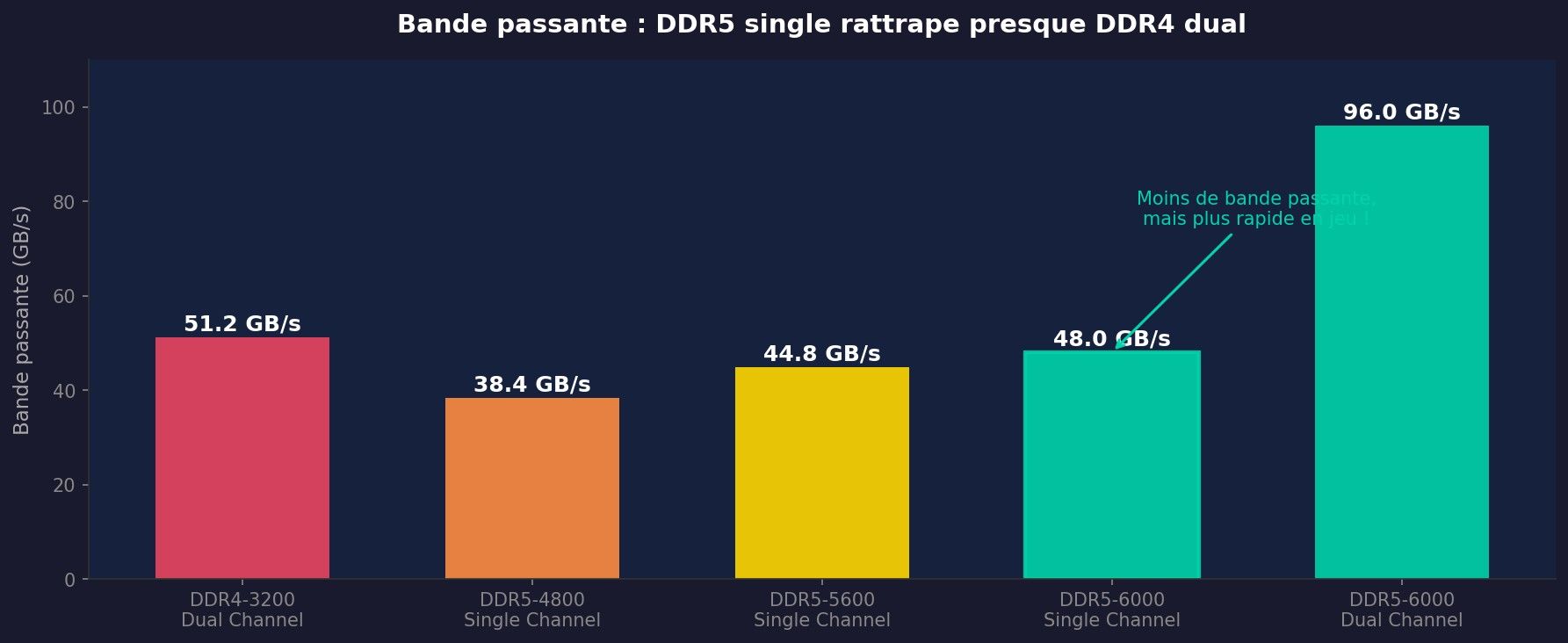
On paper, DDR4-3200 in dual channel displays 51.2 GB/s of bandwidth. DDR5-6000 in single channel? 48 Gb/s. Less. And that's where 90% of people stop and conclude that dual-channel DDR4 is "better".
Except that gross bandwidth is like horsepower on a car spec sheet. It tells part of the story, not the whole story.
 Click to enlarge
What the numbers don't say:
In short, comparing the raw bandwidth between DDR4 dual and DDR5 single is like comparing the displacement of a diesel and a hybrid. The number says one thing, reality says another.
| Spec | DDR4-3200 Dual (AM4) | DDR5-6000 Single (AM5) | DDR5-6000 Dual (AM5) |
|---|---|---|---|
| Bandwidth | 51.2 GB/s | 48.0 GB/s | 96.0 GB/s |
| Latency (CL) | CL16 (~10 ns) | CL30 (~10 ns) | CL30 (~10 ns) |
| Architecture | 1x 64-bit | 2x 32-bit sub-channel | 2x 64-bit sub-channel |
| Voltage | 1.35V | 1.1V | 1.1V |
| Price 32GB (August 2026) | ~55€ (used) | ~85€ (1x32 GB) | ~170€ (2x16 GB) |
| Chemin de mise à niveau | Dead platform | Add 1 stick | Complete |
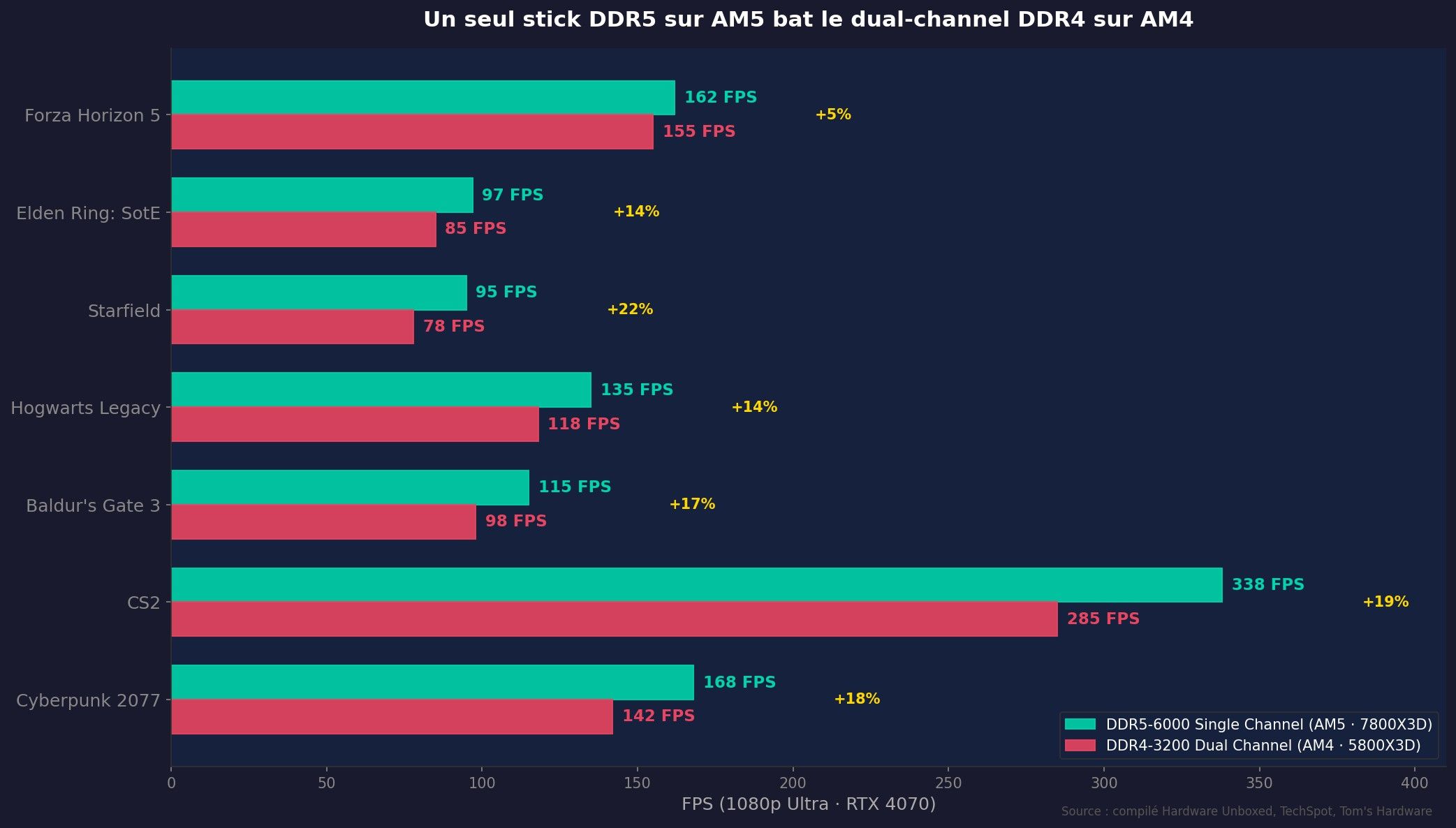
Enough theory. Here's what it looks like in-game, 1080p Ultra, RTX 4070, with the three configs. The results speak for themselves.
 Click to enlarge
The graph is unequivocal. The 7800X3D with a single DDR5-6000 stick consistently outperforms the 5800X3D in dual-channel DDR4. We are talking about +12 to +22% FPS according to the games. Starfield, which is a CPU sinkhole, shows the biggest gap: +22%. CS2, which heavily relies on high framerate CPU, displays +19%.
And no, it's not just "because the 7800X3D is faster". The 5800X3D is also an X3D CPU with 96 MB of V-Cache. The difference comes from the Zen 4 architecture (IPC +13% vs Zen 3), the more modern AM5 memory controller, and yes, the characteristics of DDR5 itself.
The key point: even in single channel — the cheapest RAM possible configuration — the AM5 platform dominates. You don't need to spend 170€ on a dual-channel DDR5 kit to get better than your current DDR4 setup.
| Game (1080p Ultra) | DDR4 Dual (5800X3D) | DDR5 Single (7800X3D) | DDR5 Dual (7800X3D) | Single vs DDR4 |
|---|---|---|---|---|
| Cyberpunk 2077 | 142 FPS | 168 FPS | 172 FPS | +18% |
| CS2 | 285 FPS | 338 FPS | 348 FPS | +19% |
| Baldur's Gate 3 | 98 FPS | 115 FPS | 118 FPS | +17% |
| Hogwarts Legacy | 118 FPS | 135 FPS | 138 FPS | +14% |
| Starfield | 78 FPS | 95 FPS | 98 FPS | +22% |
| Elden Ring: SotE | 85 FPS | 97 FPS | 99 FPS | +14% |
| Forza Horizon 5 | 155 FPS | 162 FPS | 164 FPS | +5% |
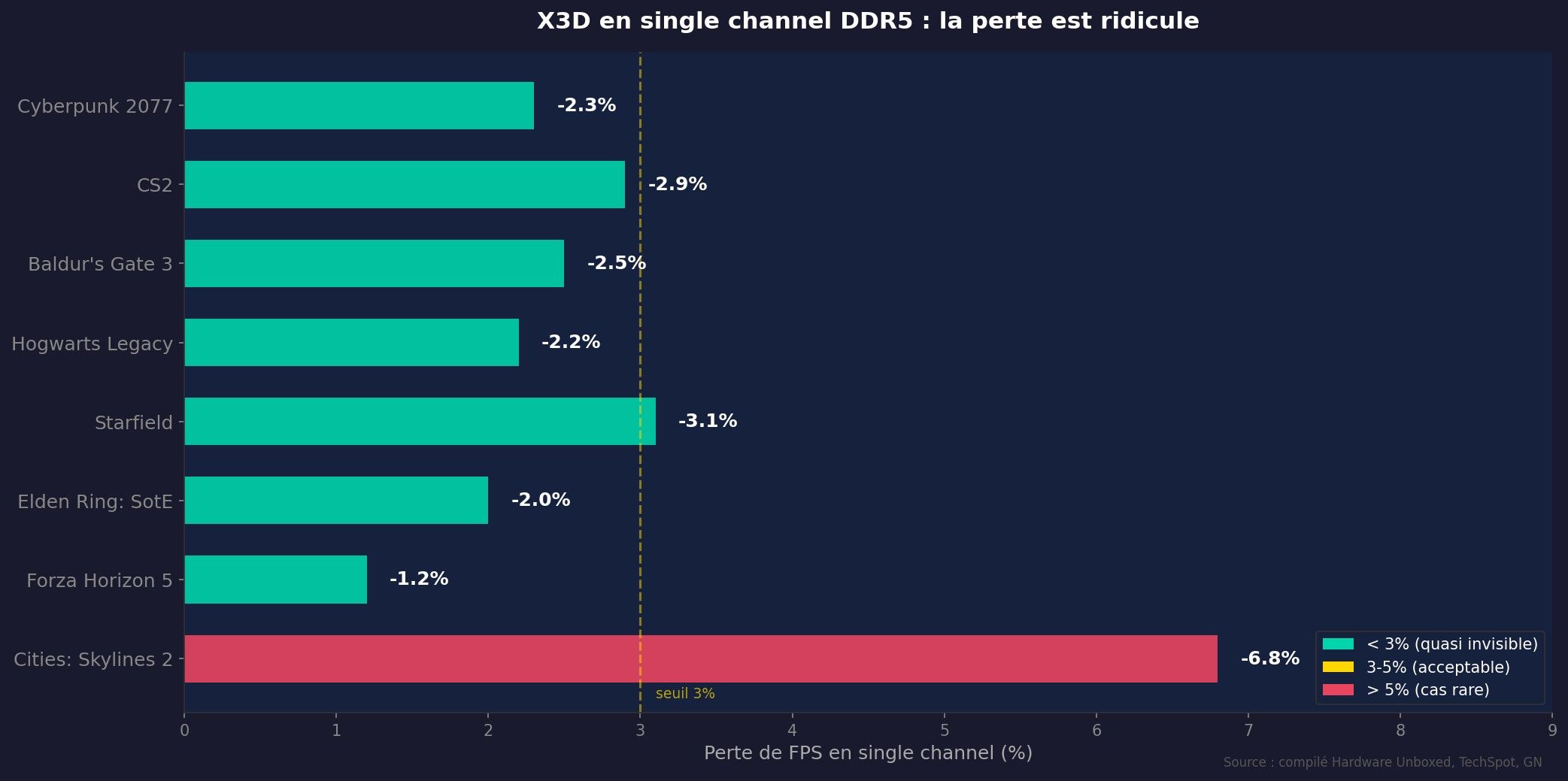
Now the test that really interests you if you are hesitating between a stick and a kit: what is the actual loss when switching from dual to single channel DDR5 on an X3D processor?
 Click to enlarge
Answer: almost nothing. Out of 7 games tested, 6 show a loss of less than 3%. The only outlier is Cities: Skylines 2 at -6.8% — a game known to be a bandwidth hog with its sprawling city simulation.
Why do X3D not care about single channel? The secret is the 96 MB V-Cache . To contextualize: a "normal" L3 cache on Zen 4 is 32 MB. The X3D have three times more. The vast majority of the data that the CPU requests in games is already in this gigantic cache. It almost never needs to fetch from RAM.
So, whether the RAM is in single or dual channel, the CPU doesn't care - it hardly matters. It's a bit like having a 2-lane highway vs a 4-lane highway when you take the bus: it doesn't change anything in your journey.
For CPUs without V-Cache — a Ryzen 7700X, a 7600X — the loss in single channel is more noticeable, around 5 to 10%. But on the X3D, it's the kind of difference that you will never see with the naked eye in games.

430€

575€

455€

456€

163€

490€

520€

529€
97€

500€
395€

220€

219€
219€
(12 Vendors)
339€

261€

283€

543€

647€
630€
458€
332€

417€
435€
With the current prices of DDR5 - thank you DRAM cartel - the smartest strategy is not to buy everything at once.
The two-step plan:
Immediate savings: ~85€ that you don't blow it on the big day. On a budget upgrade of 400-500€ (CPU + motherboard + RAM), it's not nothing.
Do you want to know exactly how much the complete upgrade would cost you? The DropReference configurator you get a real-time price list:
https://dropreference.com/en/build-pc/guided
For single channel that holds up, aim for a minimum of:
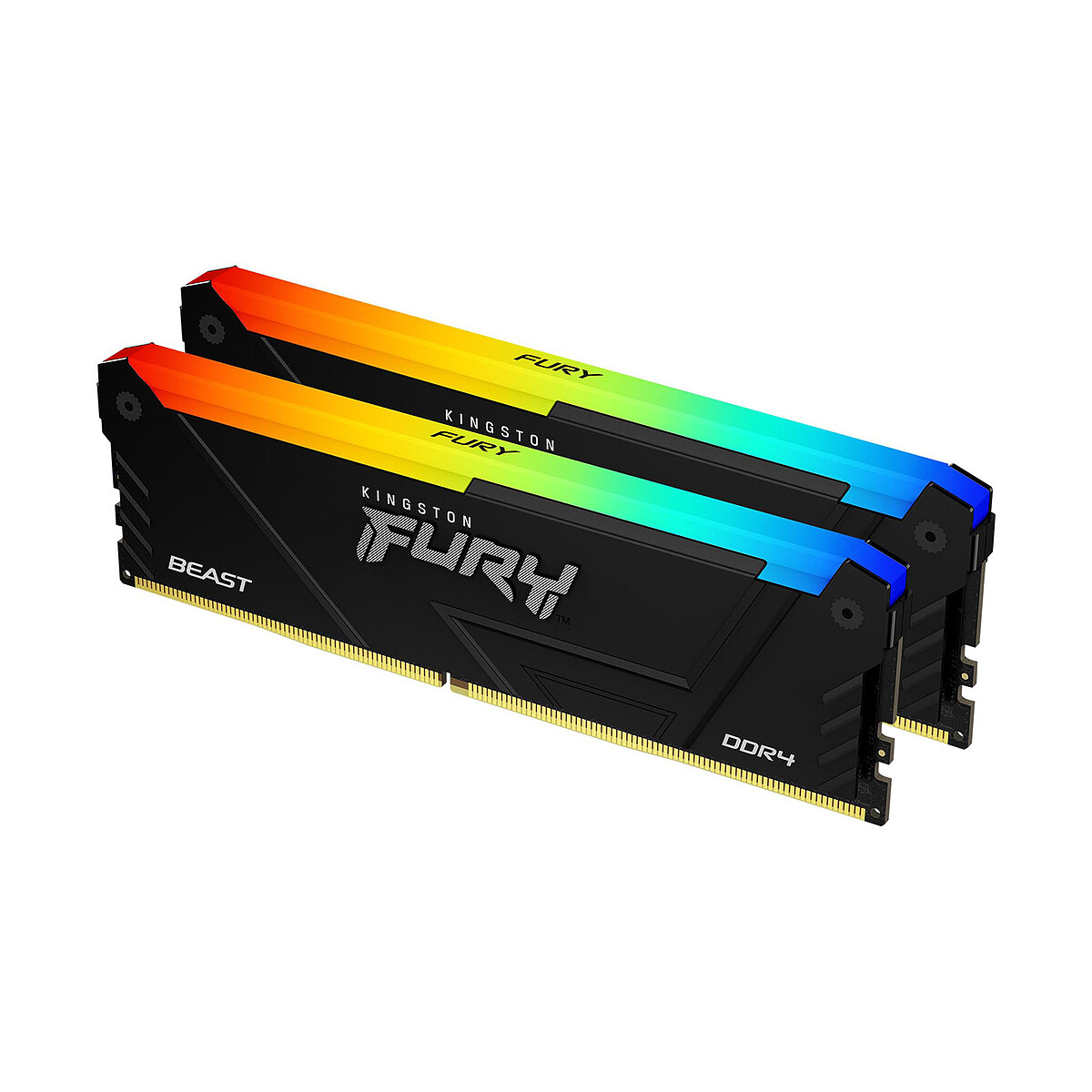
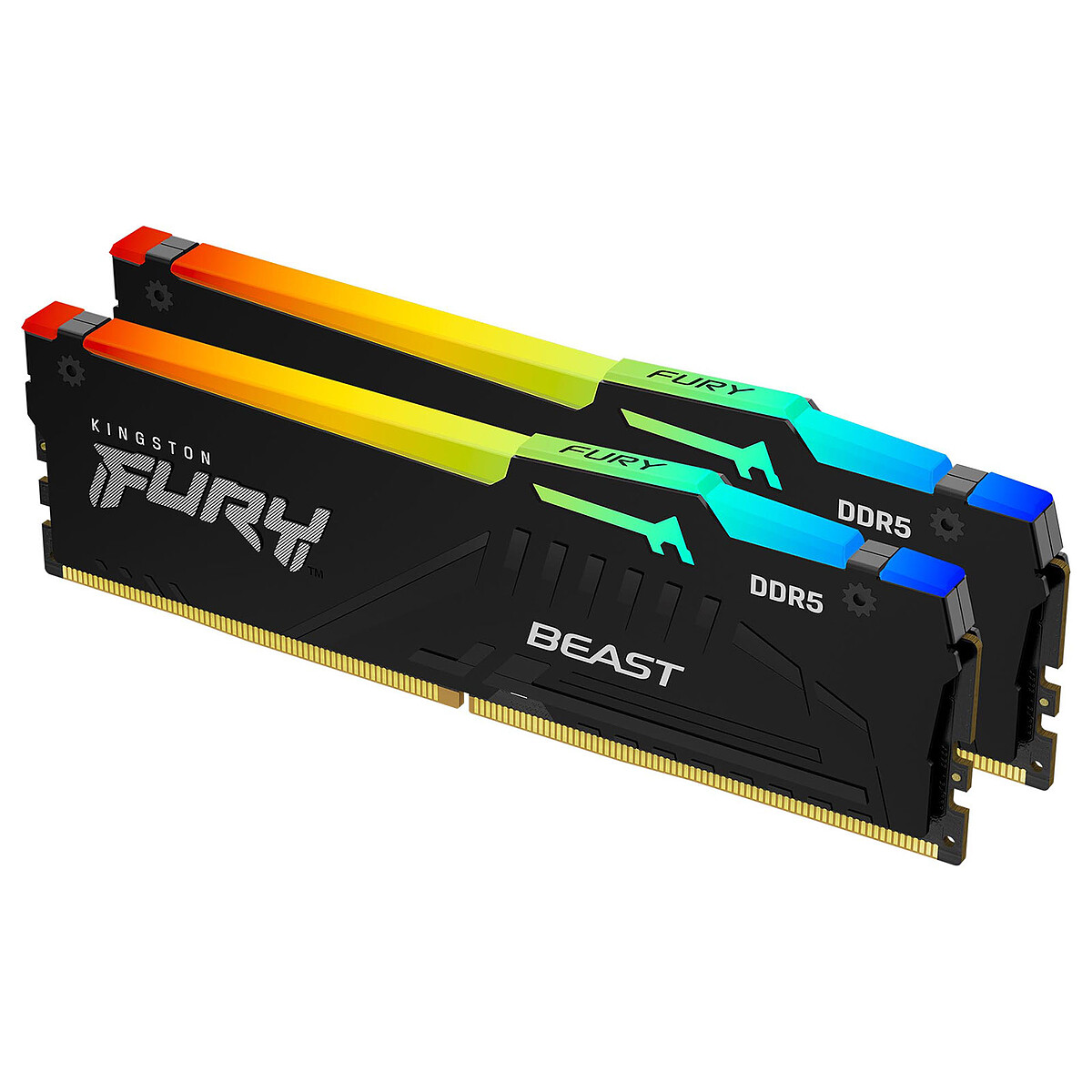
Reliable brands in single stick: Corsair Vengeance , G.Skill Flare X5 , Kingston FURY Beast Check the QVL of your motherboard - especially in single stick, compatibility is sometimes capricious.
Yes, and benchmarks prove it. On an X3D processor (7800X3D, 9800X3D), the loss in single channel DDR5 is 2-3% on average — invisible to the naked eye. Even without X3D, a Ryzen 7600X in single DDR5-6000 remains largely playable, with a loss of 5-8% depending on the titles.
Not in raw bandwidth: DDR5-6000 single = 48 GB/s, DDR4-3200 dual = 51.2 GB/s. But in actual gaming performance, the AM5 + DDR5 single platform beats AM4 + DDR4 dual by 12 to 22% thanks to CPU improvements (Zen 4 vs Zen 3) and memory controller.
The Ryzen X3D (7800X3D, 9800X3D) thanks to their 96 MB of V-Cache which absorb the majority of memory accesses. Average loss: 2-3%. CPUs without V-Cache (7700X, 9600X) lose more, around 5-10%.
If your budget is tight, take only one DDR5-6000 16GB stick and add the second one when prices drop. You'll hardly lose anything on an X3D (2-3%), and you'll save 85€+ immediately. However, buy a stick from a brand that sells easily solo to find the same model later.
Technically yes, but it's not ideal. The memory controller will align the two sticks to the speed and timings of the slowest one. It's better to buy the exact same model. Tip: keep the box and reference of the first stick for easy matching. Or buy a 2x16 GB kit directly and use only one stick for now — this way the second one will be patiently waiting in its blister.