Steam Controller 2026: price, release date, specs, and first tests before May 4th

Steam controller 2026 Valve controller PC gaming controller

Valve finally releases its new Steam Controller on May 4, 2026. $99 / €99 / £85, TMR sticks, dual trackpads, gyroscope - we take stock before the launch.

The Steam Controller is back, and this time Valve didn't do things by halves

11 years after the first Steam Controller — which had divided everyone with its round trackpads and the absence of a right stick —, Valve is back at it. new Steam Controller will be released on May 4, 2026 at 7pm Paris time, exclusively on the Steam Store. And let's say it right away: this version has nothing to do with the original.

99 $, 99 €, 85 £. That's the price announced by Valve for its next-generation controller. This places it above a DualSense (around 75 €) or a standard Xbox controller (65 €), but below the Elite models. A premium positioning assumed, especially when looking at the technical specifications.

Because this controller is basically a Steam Deck without a screen. Dual TMR anti-drift sticks, dual trackpads, 6-axis gyroscope, 4 rear buttons, Grip Sense, 35 hours of battery life. We are far from the basic pad.

The first tests have come in at Tom's Hardware, PC Gamer, and TechRadar — and the verdict is quite unanimous. We break it all down.

Complete technical specifications

Before going into detail, here's what we know about the specs:

Feature Detail
Price $99 (US, excluding taxes) / €99 (EU, incl. taxes) / £85 (UK, incl. taxes)
Release Date May 4, 2026, 7:00 PM Paris time
Availability Steam Store only (US, UK, Canada, EU, Australia, Japan, Korea, Hong Kong, Taiwan)
Analog sticks 2x TMR (Tunneling Magnetoresistance), capacitive, symmetrical
Trackpads 2x 34.5 mm squares, haptic
Gyroscope 6 axes (IMU), activable via Grip Sense
Back buttons 4 (R4, R5, L4, L5), remappable
Triggers Hall Effect magnetic (no two-stage)
Front buttons A, B, X, Y + D-pad + View, Menu, Steam, QAM
Haptic 4 motors (2 trackpads + 2 grips)
Polling rate 250 Hz (4 ms) / ~8 ms end-to-end latency
Battery 8.39 Wh Li-ion, 35+ hours of autonomy
Connectivity Wireless 2.4 GHz (Puck dongle), Bluetooth 4.2+, Wired USB-C
Weight ~292 g
Compatibility PC, Mac, iOS, Android, Steam Deck, SteamOS
Swipe to view more

Design: the Steam Deck in controller version

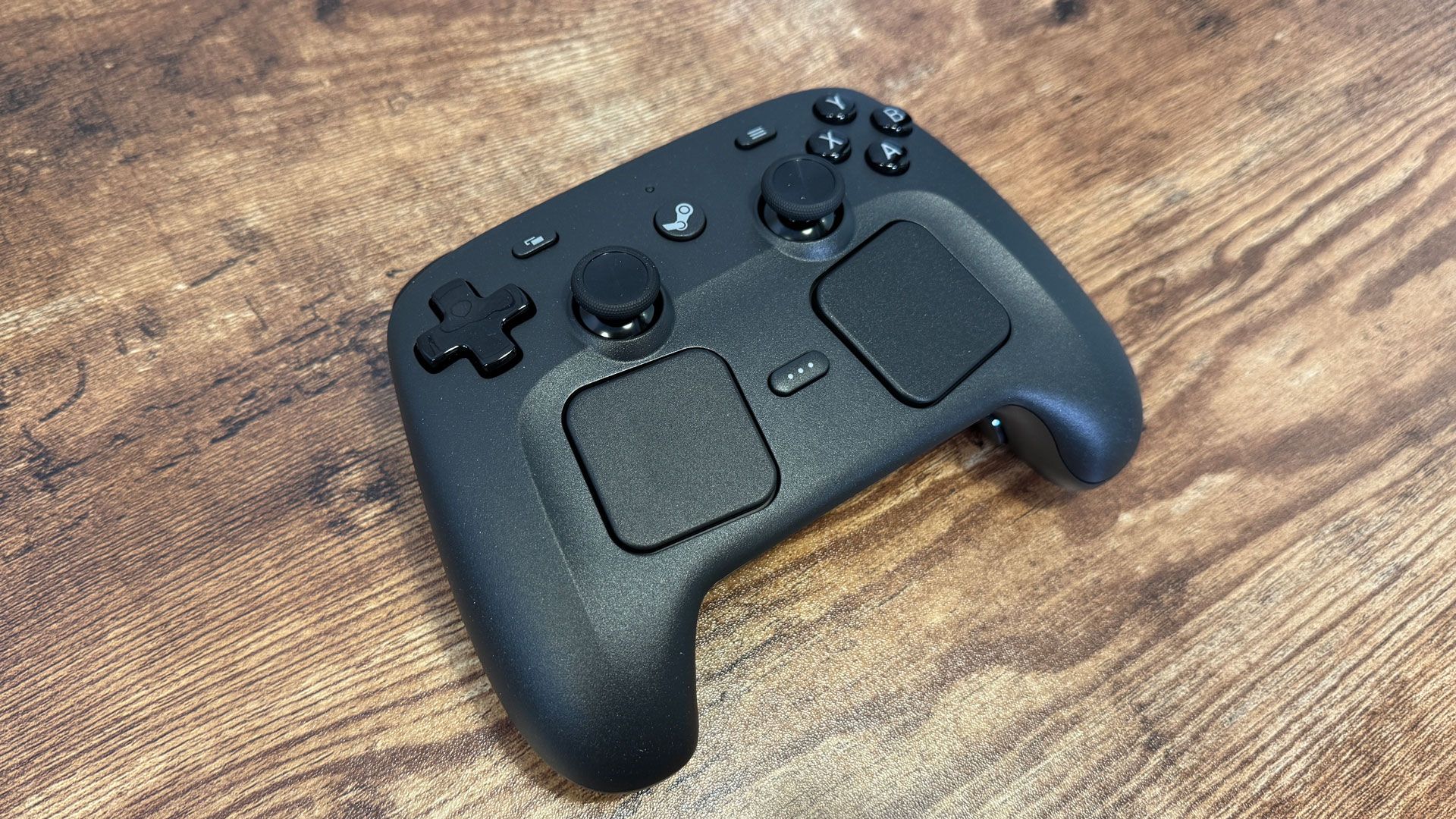
Steam Controller 2026 vue du dessus - layout boutons et trackpads Click to enlarge

First observation when you take the controller in hand: it's clearly the same philosophy as the Steam Deck. Symmetrical layout, two sticks placed below the face buttons (and not above like on Xbox), two square trackpads of 34.5 mm, and a D-pad on the left.

The plastic feels solid without being cheap. However, 292 grams on the scale, you can feel it. It's heavier than a DualSense (about 280 g) and significantly more than a standard Xbox controller (~240 g). The grips are thick — good news if you have large hands, a bit bulky otherwise.

The sticks TMR (Tunneling Magnetoresistance) are the same type as on the Steam Deck OLED. The technology is supposed to eliminate drift — no physical contact on the potentiometers, it's purely magnetic. More accurate than the classic Hall Effect according to Valve, and more energy-efficient. In practice, testers confirm: no sign of drift, immediate response, and the capacitive touch on the sticks allows to detect if your thumb is placed on them (useful to activate the gyro automatically).

The front buttons? Correct, nothing more. Membrane, not mecha — a notch below what you find on Xbox controllers or the DualSense. It's the only real recurring criticism in the tests.

Trackpads and gyroscope: the real selling point

This is where the Steam Controller stands out from all the competition. The two haptic trackpads allow you to navigate the Windows desktop as with a laptop trackpad — but better. You can configure them as mouse, trackball, or joystick mode via Steam Input. In FPS games, the right trackpad completely replaces the mouse for aiming. Not as precise as a real mouse, obviously, but far superior to an analog stick.

And then there is the 6-axis gyroscope . Activable via le Grip Sense — you squeeze the grips, the gyro activates. You release, it turns off. No need to press a button, it's transparent. In practice, it gives a hybrid stick + gyro system for aiming which, once mastered, is frankly formidable. Tom's Hardware and PC Gamer tests are unanimous: in Portal 2, Returnal or even games that do not natively support gyro, it's a game changer.

The catch: it takes some time to adapt. If you've never used a gyro to aim, count on a good week before it becomes natural. But once you get past that hurdle, it's hard to go back.

Autonomy and connectivity: the Puck that changes everything

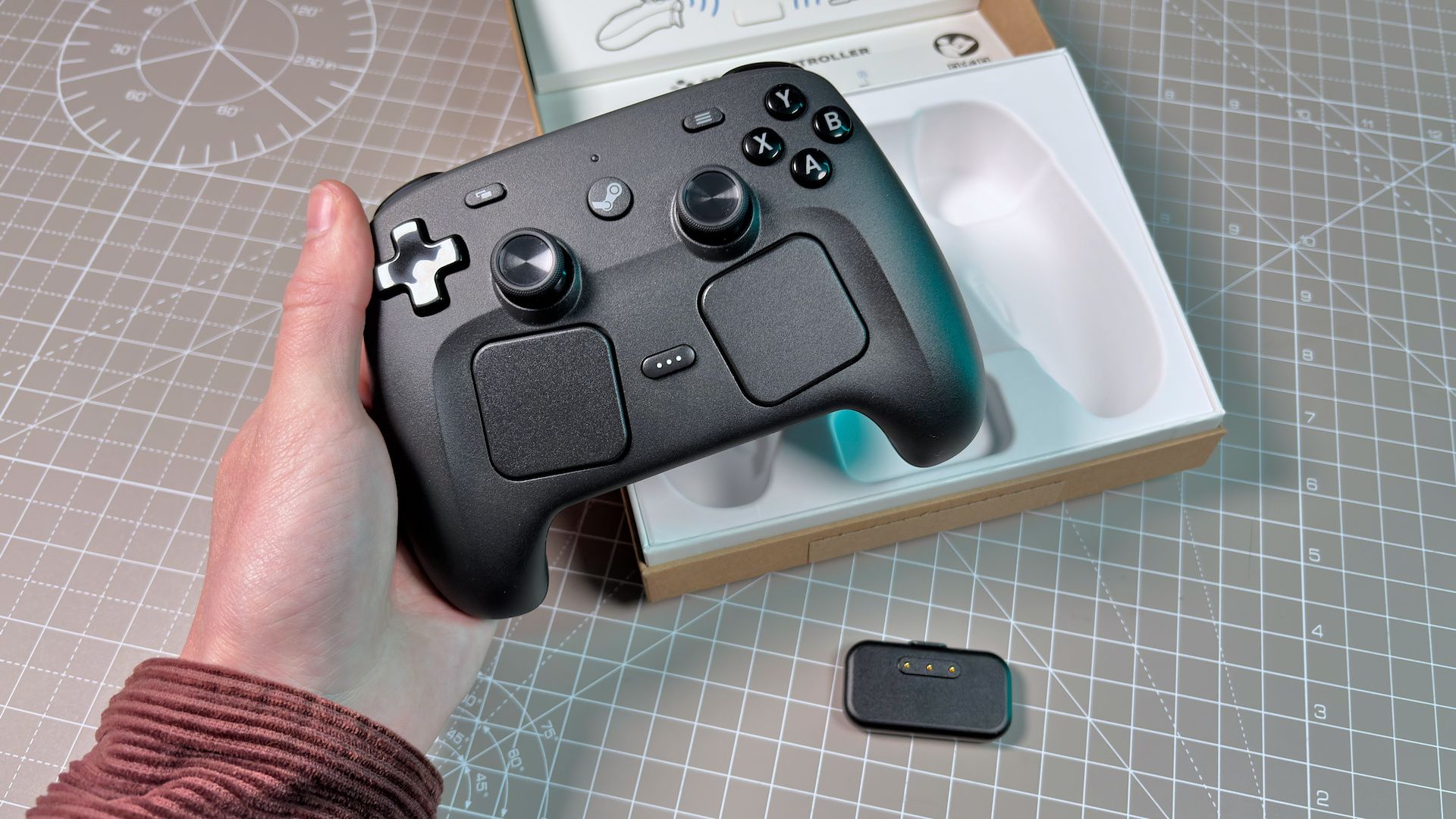
Steam Controller 2026 unboxing - contenu de la boîte Click to enlarge

35 hours of autonomy. Yes, thirty-five. Next to it, the DualSense and its 10-15 hours pale in comparison. Even the Xbox controller with its AA batteries (around 40 hours) is barely ahead. It's the 8.39 Wh Li-ion battery and the low-power TMR sticks that do the job.

The wireless connection system goes through the Steam Controller Puck — a USB dongle that serves as a 2.4 GHz receiver AND a magnetic charging base. You plug the Puck into your PC, you place the controller on it when you're not playing, and it charges. It's elegant and practical. You can also connect up to 4 controllers to a single Puck.

Bluetooth is also part of the equation (minimum 4.2, 5.0+ recommended), and you can play wired via USB-C. In terms of latency, the 2.4 GHz wireless displays 4 ms of polling (250 Hz) and about 8 ms end-to-end latency. Not the 1000 Hz like high-end gaming mice, but more than enough for couch gaming.

Steam Input: extreme customization

The true strength of the Steam Controller is the software. Steam Input allows you to remap absolutely everything: every button, every trackpad, every gyro movement. You can assign keyboard shortcuts, create layers of actions (shift mode), configure the gyro to activate only when you aim, adjust sensitivity by zone...

And for those who are too lazy to set everything up manually, there are community profiles. For most popular games, someone has already created an optimal profile. You download it with one click and you're good to go.

The flip side of the coin: all of this goes through Steam. Outside of the Valve ecosystem, the controller loses a good portion of its advanced features. No Steam Input on the Epic Games Store or Game Pass without tinkering. That's the compromise.

Comparison: Steam Controller vs DualSense vs Xbox

Steam Controller 2026 DualSense (PS5) Xbox Wireless Xbox Elite Series 2
Price 99 € / 99 $ / 85 £ ~75 € ~65 € ~140 €
Bâtons TMR anti-drift, symmetrical Hall Effect, asymmetric Classic, asymmetrical Adjustable tension, interchangeable
Trackpads 2x 34.5 mm haptic 1 small (clickable) No No
Gyroscope 6 axes + Grip Sense Yes (basic) No No
Back buttons 4 integrated No (except Edge) No 4 removable pallets
Battery life 35+ hours 10-15 hours ~40h (AA batteries) ~40 hours
Haptic 4 motors Advanced haptic feedback Classic vibration Classic vibration
Adaptive triggers No Yes No Adjustable courses
Polling 250 Hz ~125 Hz (BT) ~125 Hz ~125 Hz
Ecosystem Steam (PC, Deck, SteamOS) PS5 + PC Xbox + PC Xbox + PC
Swipe to view more

In summary: if you mainly play on Steam from your couch or bed, the Steam Controller is probably the best choice in 2026. The trackpads and gyro give it a real advantage that no one else offers at this level. However, if you want a versatile controller that works everywhere without configuration — or if you love the adaptive triggers of the DualSense — this may not be for you.

What the first tests say

The reviews came out a few days before the release. Overall, it's very positive:

  • TechRadar — Performance 4.5/5, Features 4/5. "Massive improvement" compared to the original. Battery and TMR sticks praised, minimal latency.
  • Gaming PC — Ergonomics 4/5, Battery 5/5, Value for money 3/5. The trackpad and gyro are judged "superior" to anything on a controller, but the 250 Hz and membrane buttons are a stain.
  • Tom's Hardware "Comfortable, feature-packed at sensible price." Strengths: customization, battery, variety of inputs. Weaknesses: optimized for Steam only, a bit heavy.

The consensus: it's the best PC controller for Steam users, provided you're willing to invest time in the setup. For basic plug-and-play, an Xbox controller remains simpler.

Steam Machine, Steam Frame: what comes next

The Steam Controller is the first of three hardware products that Valve plans to release in 2026. Behind, there is the Steam Machine (a PC console under SteamOS) and the Steam Frame (a dock/screen for Steam Deck). The details are still unclear, but the Puck is already designed to pair multiple controllers to a Steam Machine.

Small downside: the Steam Machine is falling behind due to the global shortage of RAM - DDR5 prices have skyrocketed in recent months, impacting production costs. Valve has not confirmed a date yet.

But the message is clear: Valve is building a complete hardware ecosystem for playing on PC from the living room. The Steam Controller is the first brick, and frankly, it's a solid brick.

How to buy it on May 4th

No pre-order. Valve announced a sale on May 4, 2026 at 10am Pacific Time (7pm Paris time, 6pm UK time, 1pm Montreal time). Exclusively on the Steam Store — not on Amazon, not at LDLC, not in stores.

The confirmed prices:

  • United States — $99 (excluding taxes, so potentially ~$120 depending on the state)
  • Europe — €99 including tax
  • United Kingdom — 85 £ incl. tax
  • Australia — 149 AU$

Availability: US, UK, Canada, EU, Australia, Japan, South Korea, Hong Kong, Taiwan. Stocks potentially limited at launch - if you're interested, be connected on the dot.

Our verdict

99 € for a controller, it's not cheap. But what Valve offers here goes far beyond a classic gamepad. The anti-drift TMR sticks, the dual trackpads, the Grip Sense gyroscope, 35 hours of battery life, 4 rear buttons, and almost unlimited customization via Steam Input - no other controller combines all of this.

The trap is the ecosystem. If 100% of your game library is on Steam, go for it. If you juggle between Epic, Game Pass, and others, you may be frustrated by the limitations outside of Steam. And if you're the type to plug in your controller without ever touching the settings, an Xbox Wireless at €65 will do just as well.

But for PC gamers who want the best possible couch experience — especially if you have a Steam Deck and want to find the same controls on the big screen — it's a clear purchase. See you on May 4th.

FAQ

Is the Steam Controller compatible with non-Steam games?

Technically yes, via Bluetooth or USB-C it is recognized as a generic controller. But you lose Steam Input and all advanced customization (trackpads, gyro, community profiles). For Epic games or Game Pass, you can add them to Steam as a non-Steam game, but it's not always stable.

Do TMR sticks really eliminate drift?

The TMR technology is physically contactless on potentiometers, so in theory, yes. The same type of sensor has been used on the Steam Deck OLED for over a year without any massive reports of drift. None of the testers have observed drift on the Steam Controller either, but only time will tell.

Is it worth switching from the original Steam Controller to the new one?

Without hesitation. The original had only one stick, oddly placed flat trackpads, and a polarizing design. The 2026 version takes the best (trackpads, customization) by adding everything that was missing (second stick, gyro, rear buttons, monster battery life). It's a massive upgrade.

Can we play with 4 players with only one Puck?

Yes. The Puck supports up to 4 Steam Controller simultaneously. Convenient for local co-op without plugging in 4 USB dongles.

Does the Steam Controller work on consoles (PS5, Xbox, Switch)?

No. It is a PC/Mac/mobile controller only. No native compatibility with Sony, Microsoft, or Nintendo consoles.