Optimizing Crimson Desert on PC: the best graphic settings in 2026

Optimization Crimson Desert PC graphics settings Crimson Desert settings

All Crimson Desert settings scrutinized with benchmarks. We provide you with optimized settings to gain 18% FPS without sacrificing quality.

Author
yuux
Co-founder of DropReference, I'm here to give you the best tips to build the gaming PC of your dreams!

Introduction

Crimson Desert runs rather well on most current PC hardware. The open world is superb, the combat is smooth, and Pearl Abyss has clearly worked on optimization. But the game has some blind spots in terms of graphics.

— visual noise in certain scenes, settings that seem to do nothing, and others that tank your FPS for an almost invisible visual gain.

This article is based on the excellent analysis by Hardware Unboxed that I really invite you to look at for visual comparisons in motion:

Watch the full video from Hardware Unboxed on YouTube

We took their benchmarks (RTX 5060 Ti 16 GB, native 1440p, Ryzen 7 9800X3D, 32 GB DDR5-6000) and crossed them with our own data. You will also find our comparison FPS by GPU/CPU on Crimson Desert here to locate your configuration.

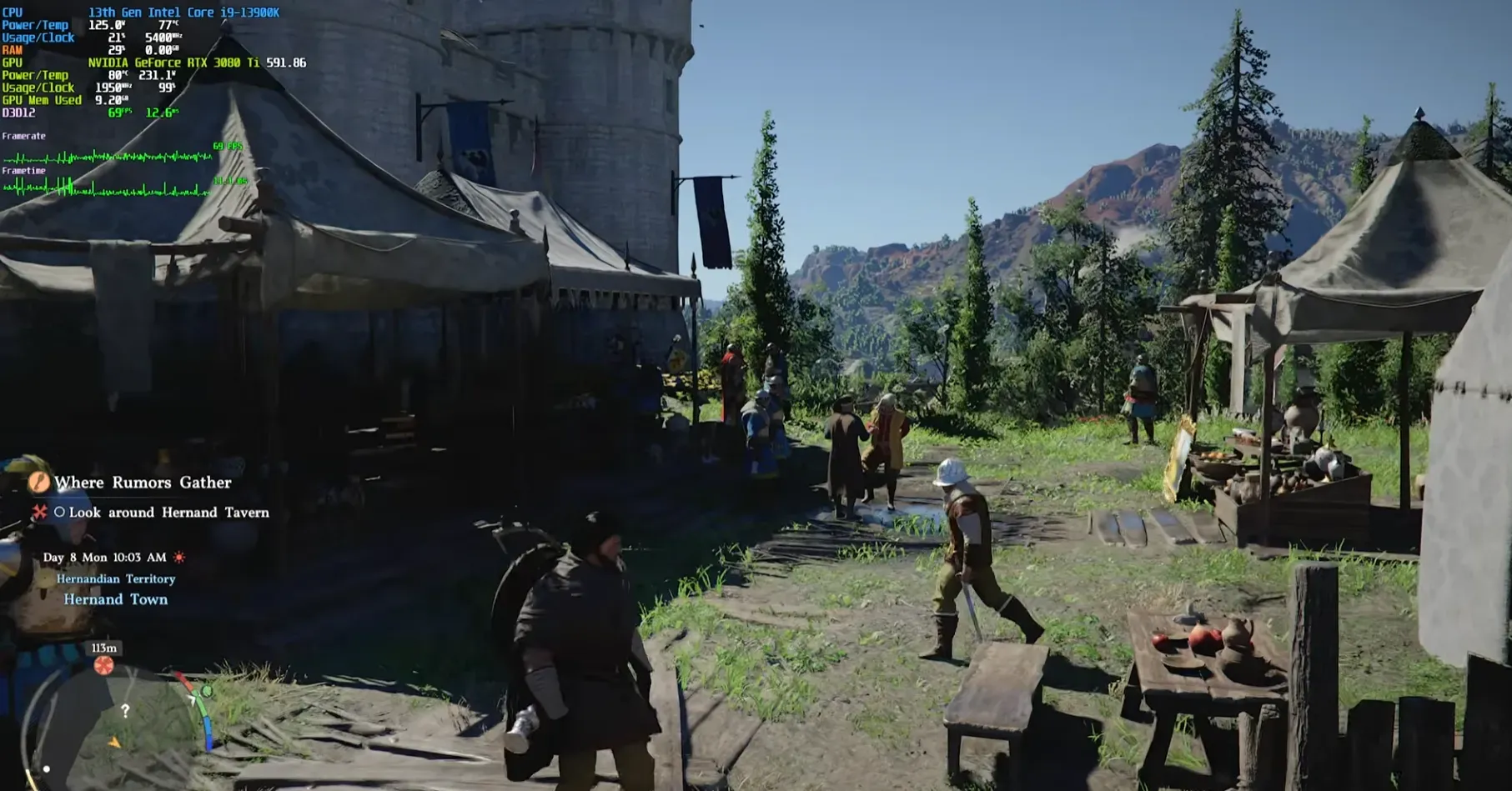
Crimson Desert gameplay avec compteur FPS Click to enlarge

The visual noise: the real problem of Crimson Desert

Outdoors and in broad daylight, Crimson Desert is magnificent. No discussion. The problem is when you enter a building or explore an underground area at night. That's where it gets tricky.

The overall lighting of the game uses a relatively low number of samples. Result: you end up with noise, pixelation, shadows that "boil"... It is especially visible in dark interiors, sewers, areas lit only by torches or your lantern.

How to reduce noise:

  • Lighting Quality on Cinematic or Ultra Paradoxically, going up to Max worsens the noise in certain areas. Ultra and Cinematic offer the best noise/quality compromise.
  • DLSS 4.0 rather than DLSS 4.5 — In the current build, DLSS 4.5 (presets M and L) produces more noise. DLSS 4.0 gives a cleaner image. On the AMD side, FSR 4 works correctly.
  • Keep Ray Tracing enabled — Disabling it does not improve FPS (we'll come back to this later) and can introduce other artifacts.
  • Play in native or near-native resolution — Upscaling in Crimson Desert degrades the image more than in other games. The lighting sample count depends on the rendering resolution, not the output resolution. As a result, DLSS Performance = noisier lighting and blurrier textures than usual.

Even with all that, you will still see some noise in certain interiors. This is an engine flaw that Pearl Abyss will have to correct through patches. But these settings significantly reduce the problem.

Ray Reconstruction and Ray Regeneration: the ultimate solution (if you have the GPU)

Nvidia offers Ray Reconstruction, AMD Ray Regeneration. Both are AI-based denoisers that clean up the image tremendously. And in Crimson Desert, activating one or the other does much more than just denoising.

The game automatically forces Lighting Quality to Max and seems to push some settings beyond of the normal maximum. Additional shadows appear, the geometry changes slightly... It's a hidden "extreme" mode, basically.

Ray Reconstruction (Nvidia) offers the best game image quality. Shadows become more precise, noise disappears almost completely, GI is significantly cleaner. The big flaw: the rain disappears. Ray Reconstruction treats it as noise and removes it. It's quite strange to play in the rain that you hear but don't see.

Ray Regeneration (AMD) is less effective. There is still noise, especially when combined with aggressive upscaling. But it's still better than without, and you benefit from the quality boost associated with the "beyond max" mode.

The cost in performance is huge: around -66% FPS compared to the Cinematic preset. To compensate, aggressive upscaling must be used (DLSS Performance or FSR Performance). In the end, Ray Reconstruction + DLSS Performance gives roughly the same FPS as Cinematic + native DAA, but with an image that is debatable between the two approaches.

If you play in native and the noise bothers you, try Ray Reconstruction + DLSS Performance. It's a trade-off, not a free upgrade. But for many, it's worth it.

Analysis of each graphic setting

We tested each setting individually to measure its actual impact on FPS. Benchmarks are conducted on an RTX 5060 Ti 16GB at native 1440p. All percentages are relative to the Cinematic preset.

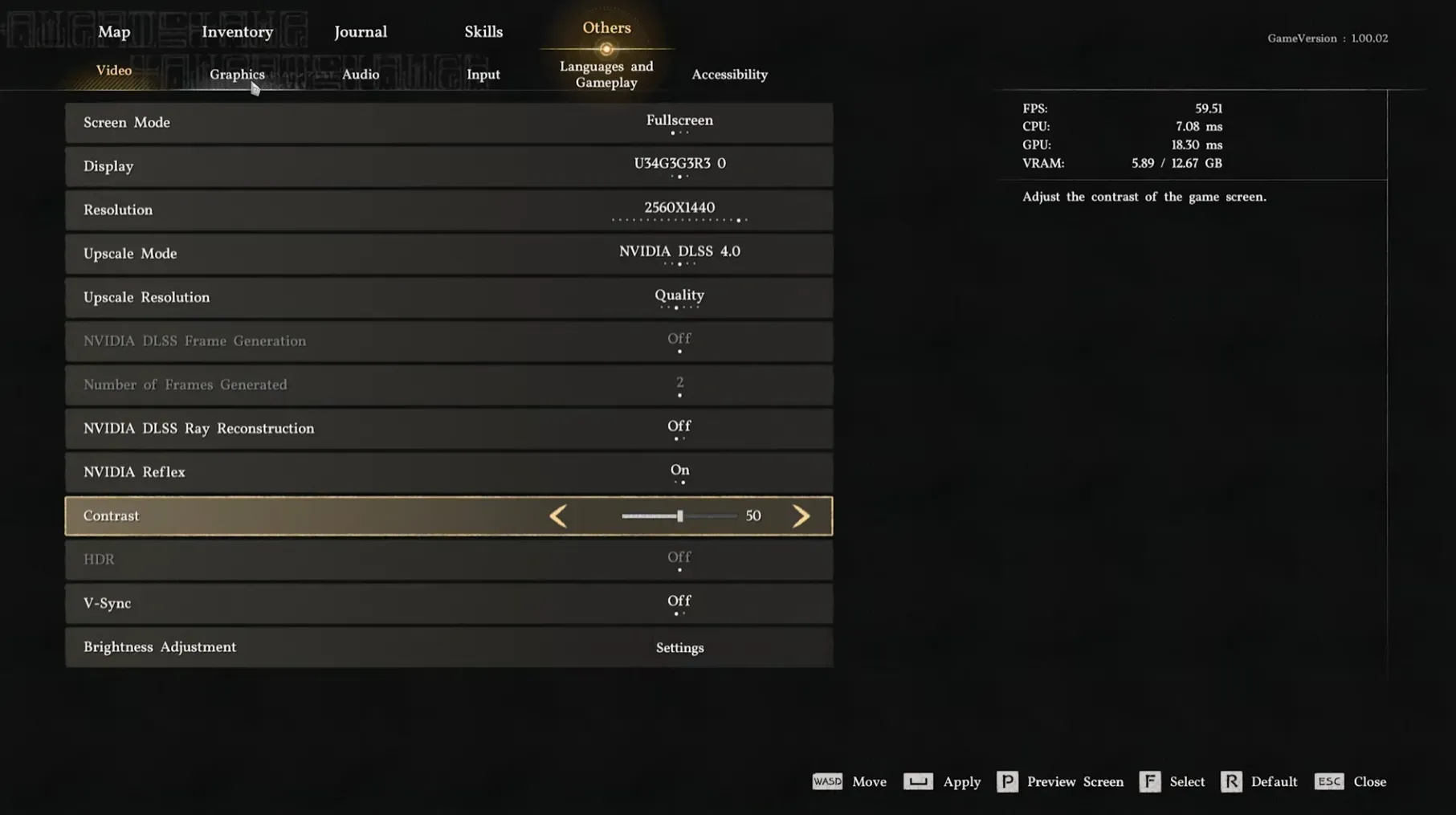
Menu des réglages graphiques de Crimson Desert Click to enlarge

The settings that should not be touched (negligible impact)

Texture Quality — Zero impact on FPS. Low removes some detailed textures and saves ~500 MB of VRAM, but otherwise Cinematic and other modes are equivalent in performance. Leave it on Cinematic.

Effect Quality — Supposed to change the flames and smoke. In practice, no significant visual difference was observed between Cinematic and Low, and no performance gain either. We leave it on Cinematic.

Simulation Quality — Physics, collisions, cloth simulation... This setting doesn't seem to change anything visually and doesn't cost anything in FPS. Cinematic.

Post-process Effect Quality Switching from Cinematic to Low disables the lens flares and that's about it. 1% gain, it's within the margin of error. Cinematic.

Water Quality — Surprising: even when swimming in a gigantic lake, the difference in FPS between Cinematic and Low is negligible. However, below Medium, surface interactions (waves, splashes) disappear. Keep Cinematic — it's free and the water can be really beautiful in this game.

Ray Tracing (on/off) — And there, that's the twist. Disable ray tracing does not improve FPS In some cases, it even degrades them by 1-2 frames. The Crimson Desert engine is designed around ray tracing, and the fallback rasterization is not optimized to go faster. Moreover, turning off RT degrades reflections, shadows, and GI. In short: keep it active, always.

The settings have a moderate impact

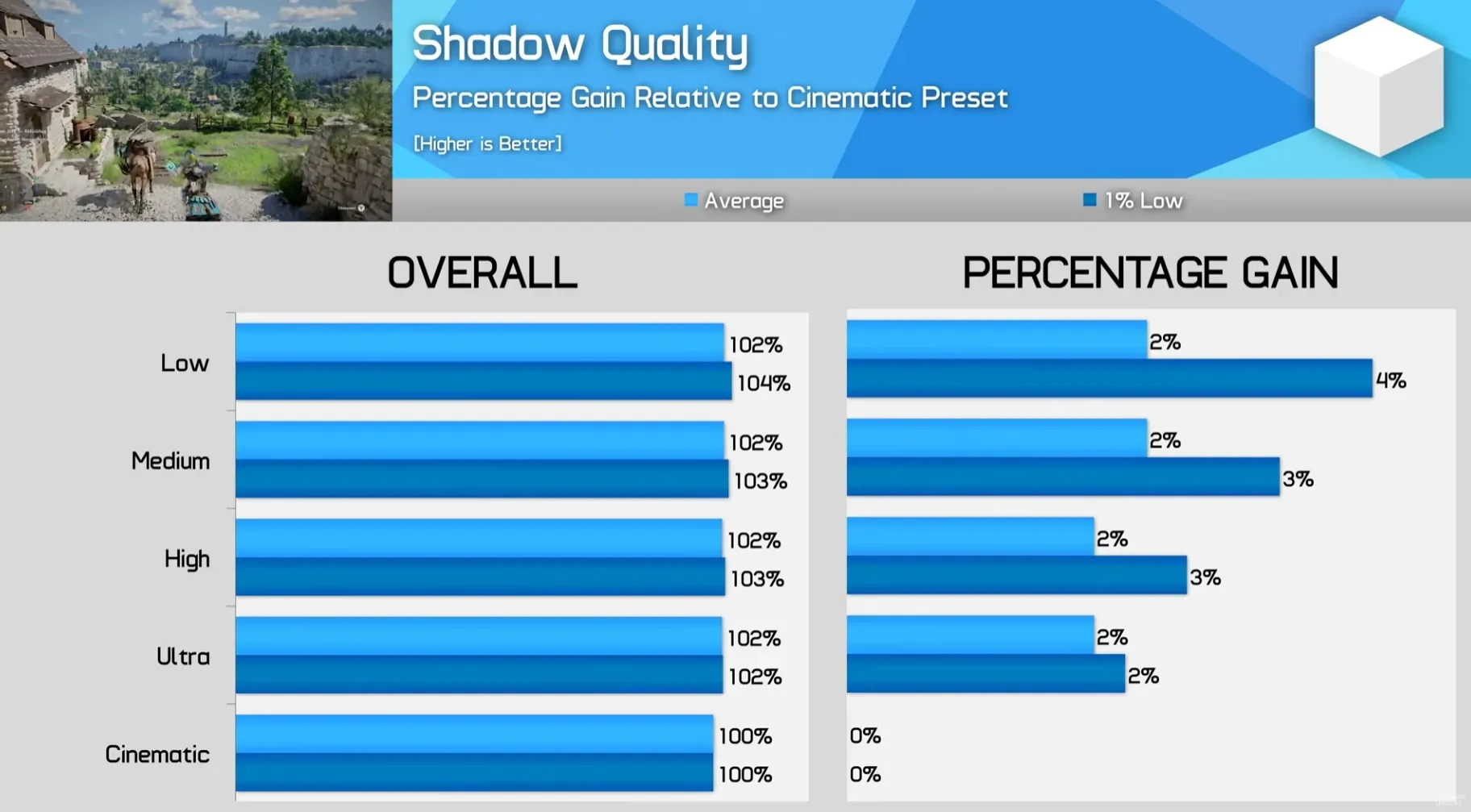
Shadow Quality — Close and distant shadows change resolution according to the setting. Below Medium, they become blurry and start to flicker. The gain is ~2% when going from Cinematic to Ultra, with no additional improvement afterwards. Ultra is the sweet spot.

Impact de la qualite des ombres sur les FPS dans Crimson Desert Click to enlarge

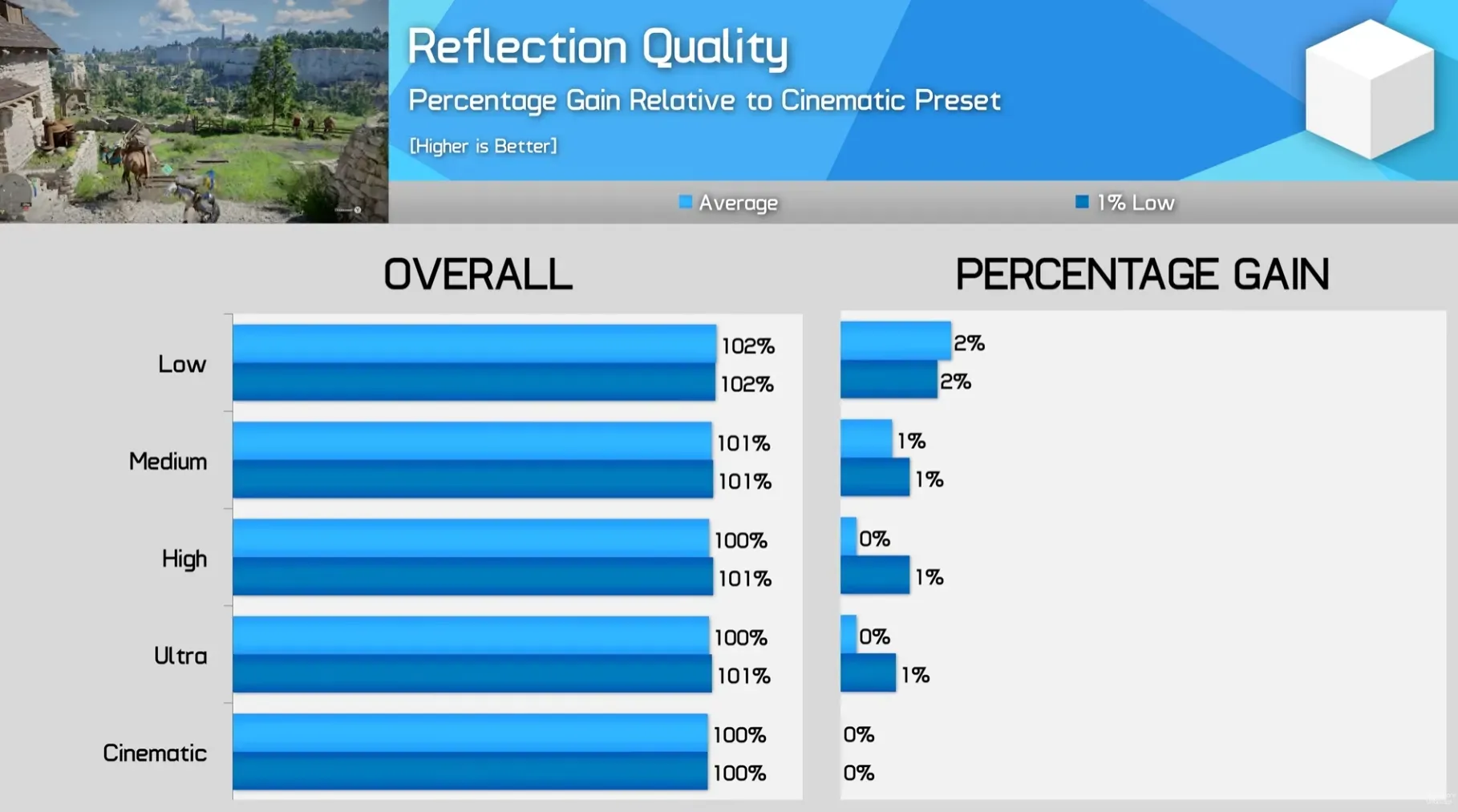
Reflection Quality — Check the number of surfaces displaying reflections and their quality. Cinematic adds more shooting distance for reflections. In practice, the maximum gain is 2% in Low, and the quality of reflections drops significantly. No need to touch that — Cinematic.

Impact de la qualite des reflets sur les FPS dans Crimson Desert Click to enlarge

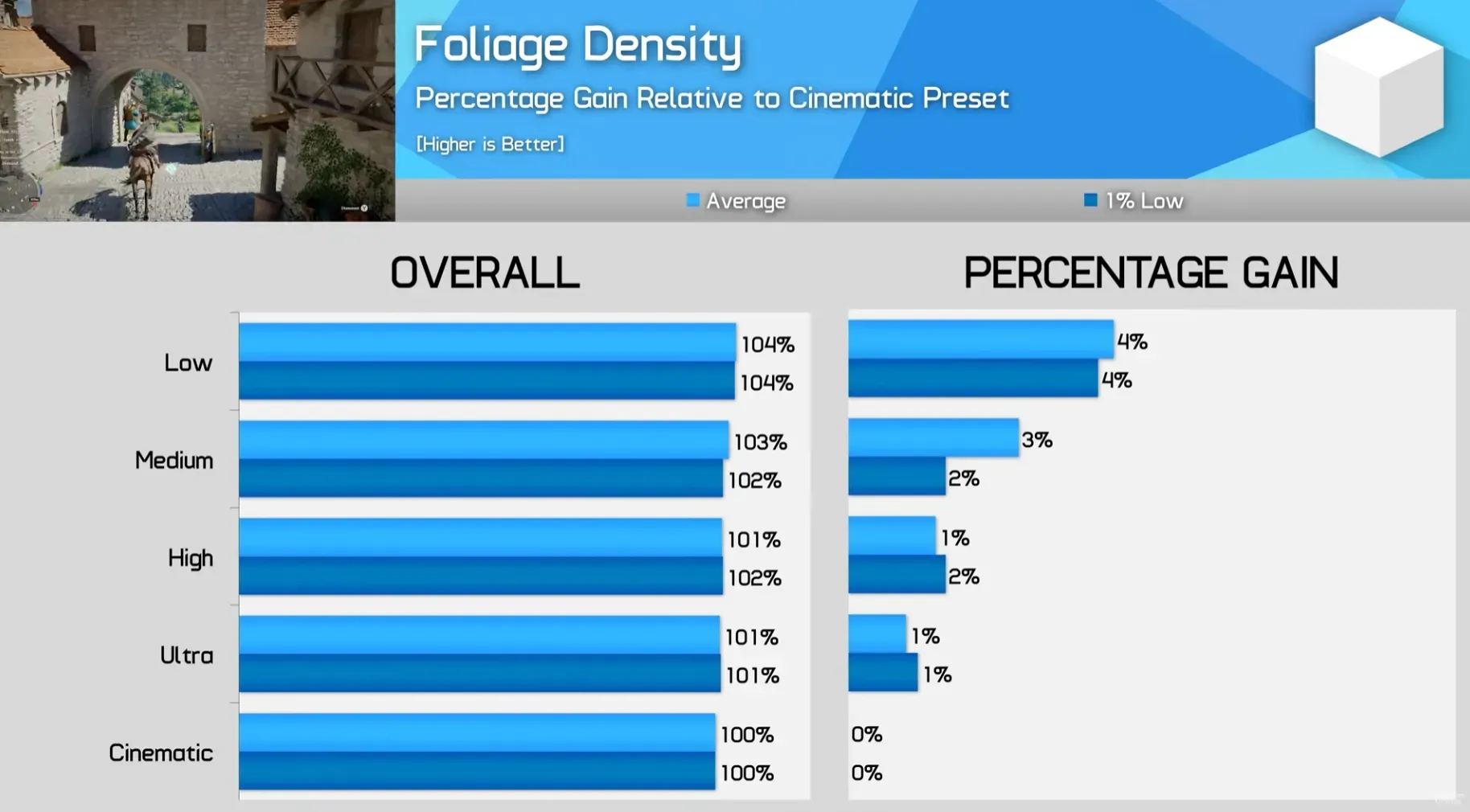
Foliage Density — The higher the setting, the more grass and bushes on the screen. The difference between Cinematic and Ultra is almost invisible. High starts to remove some distant vegetation. Low looks really naked. The gain: 4% on Low, 3% on Medium. Stick with Cinematic if the FPS are good, Medium if you're struggling.

Impact de la densite de vegetation sur les FPS dans Crimson Desert Click to enlarge

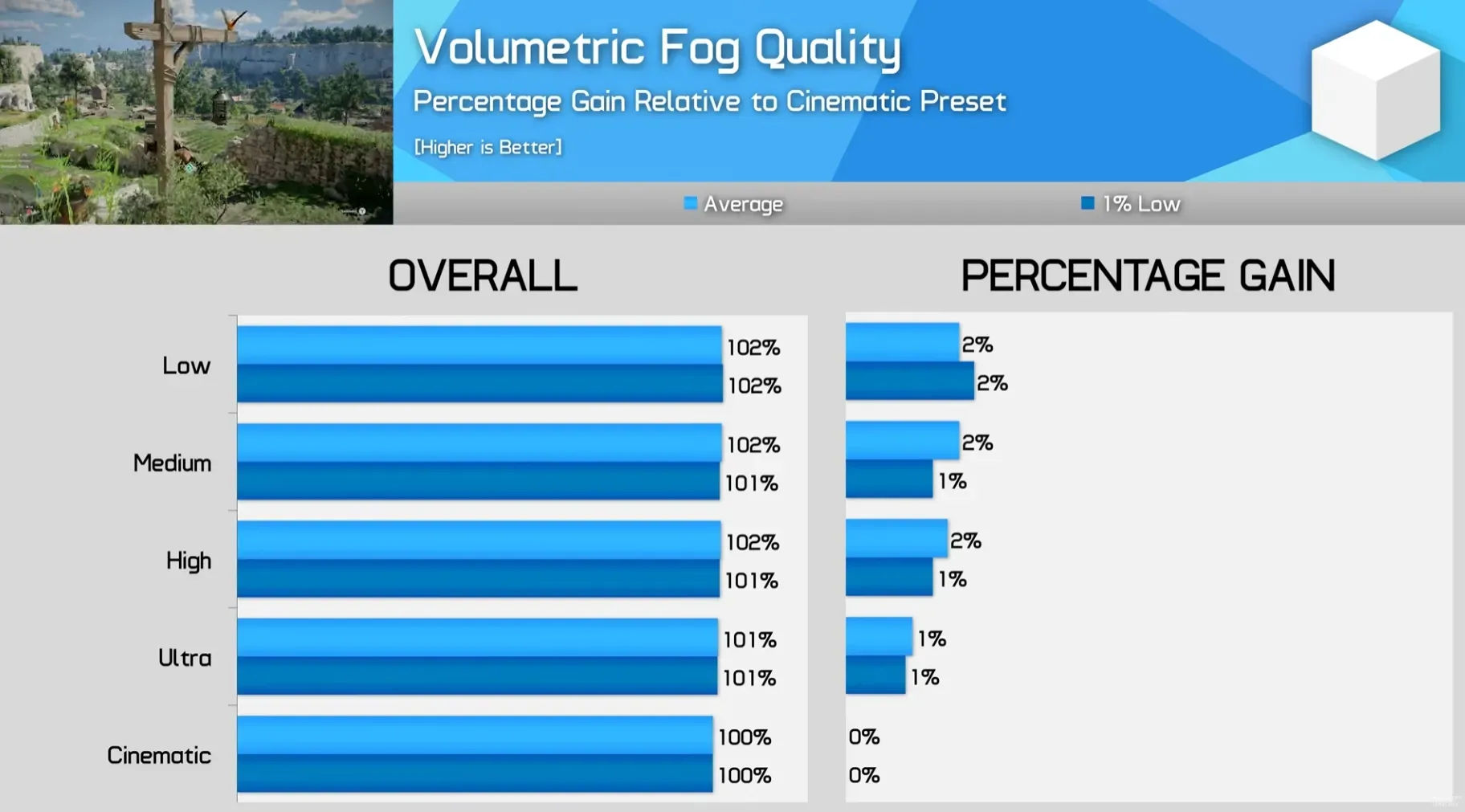
Volumetric Fog Quality — Subtle impact on the quality of the fog. Below High, indoor fog starts to have artifacts. The maximum gain is 2%, but High already offers a quality very close to Cinematic. It is recommended. High to scratch these 2% without any visible regression.

Impact du brouillard volumetrique sur les FPS dans Crimson Desert Click to enlarge

The settings that really matter

Model Quality — This setting changes the geometry of the world: trees, rocks, buildings, terrain. The strange thing is that lowering this setting doesn't always make the game "less beautiful" in an obvious way. Some surfaces become more bumpy, others change shape, but it's not necessarily worse visually.

The real difference is between Cinematic and Ultra: Cinematic adds more detail to branches and leaves, which gives a denser world. Below Medium, the geometry simplifies too much and the ground becomes flat.

Performance side: 4% gain in Ultra , and Ultra/High/Medium are almost identical in performance. The big jump is towards Low (+9%). We recommend Ultra — the best compromise.
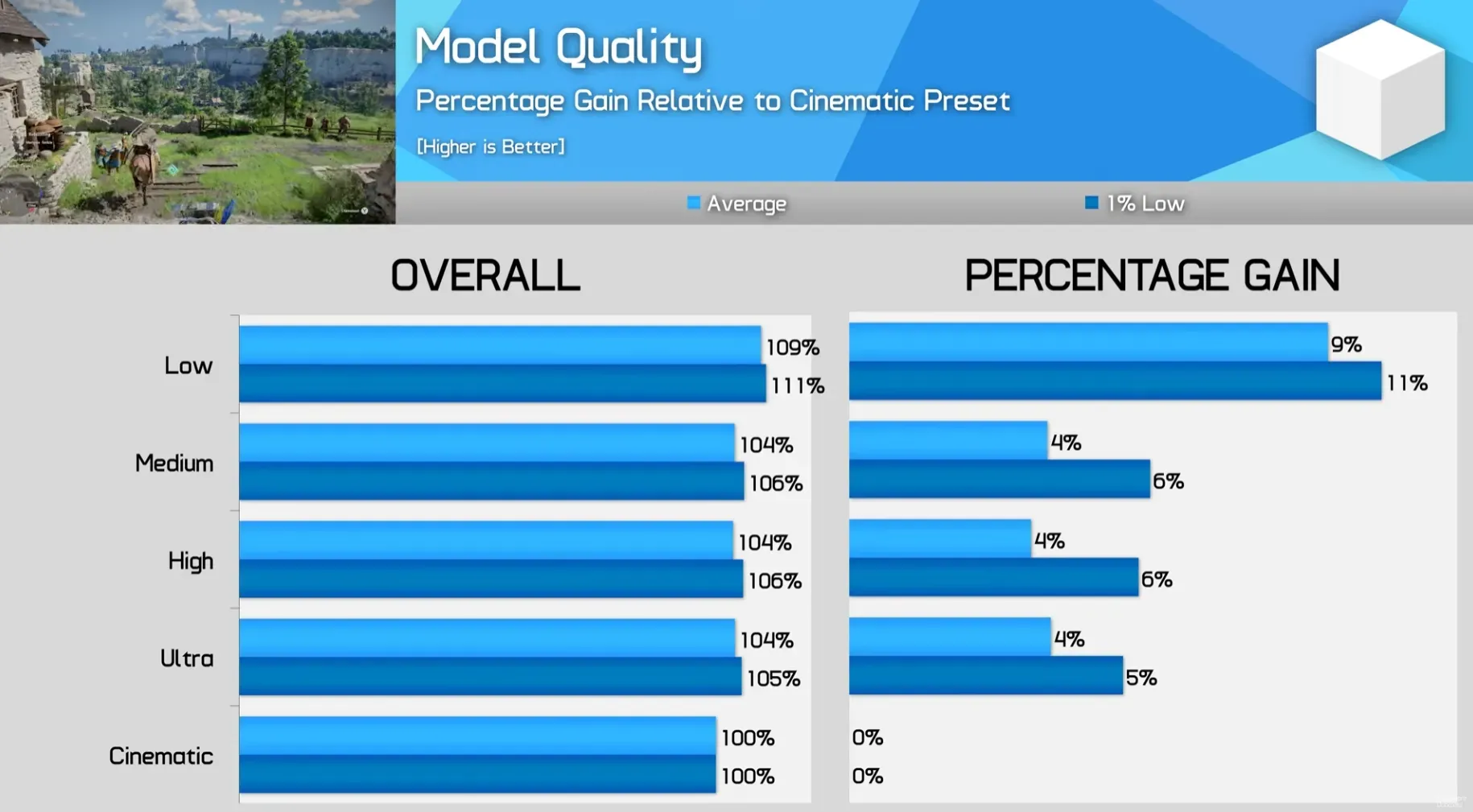
Impact de la qualite des modeles sur les FPS dans Crimson Desert Click to enlarge

Lighting Quality — the king of optimization It is THE setting that makes the biggest difference in Crimson Desert. It affects global illumination (GI), the resolution of indirect lighting, and even the quality of reflections (yes, independently of the Reflection setting).

The Cinematic and Ultra modes have more precise GI with more surfaces affected by indirect light. From Medium, indoor lighting becomes significantly darker and less natural. Low is a completely different game visually.

And then there is the mode Max . This one offers reflections in better resolution and superior lighting, but it costs -36% FPS compared to Cinematic. This is the mode that activates automatically with Ray Reconstruction.

The sweet spot: Ultra You win 9-10% of FPS compared to Cinematic, with a still very clean visual quality. High and Medium are close in performance to Ultra but with more artifacts. Low gives +14% but the image takes a hit.
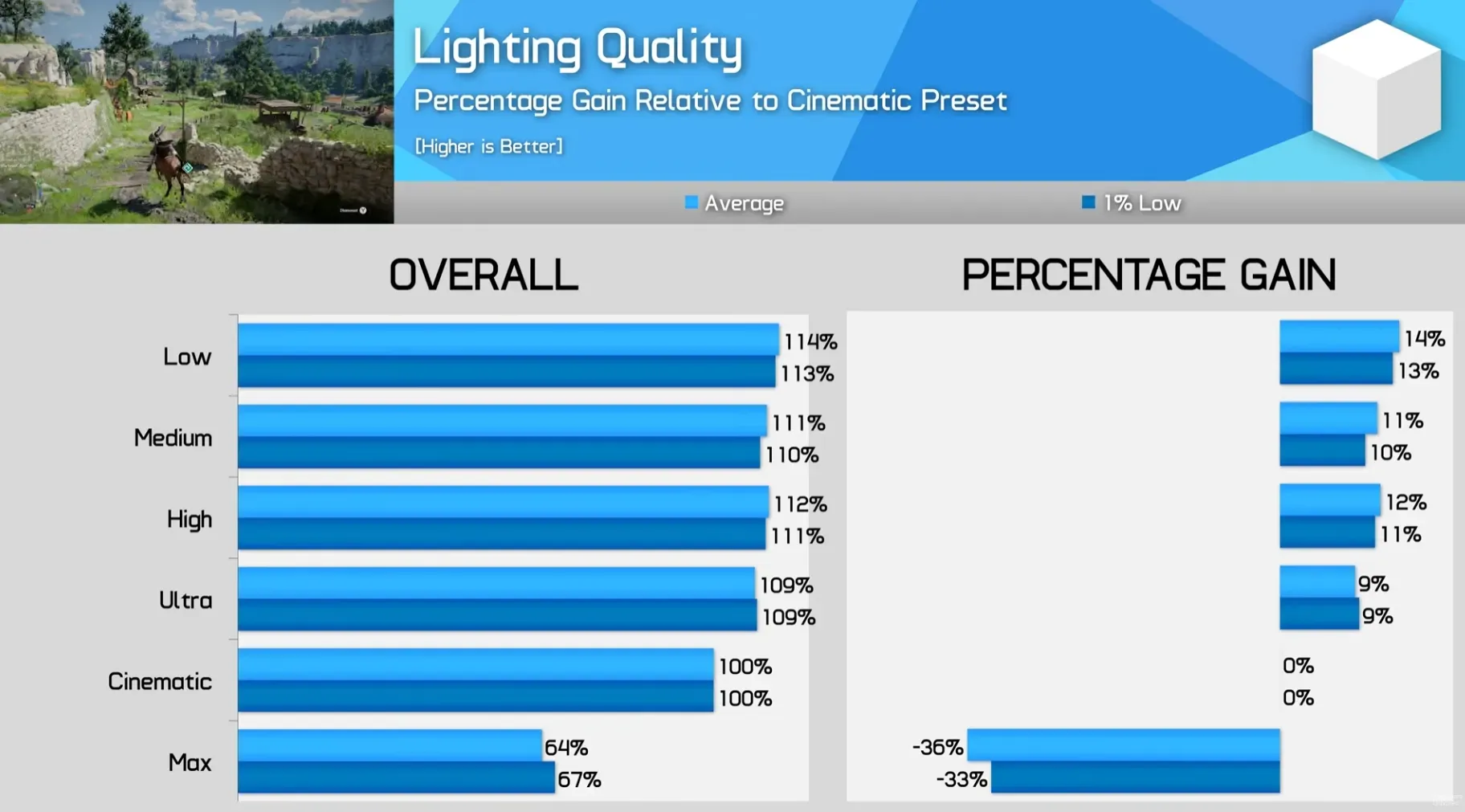
Impact de la qualite de l'eclairage sur les FPS dans Crimson Desert Click to enlarge

Our optimized settings for Crimson Desert

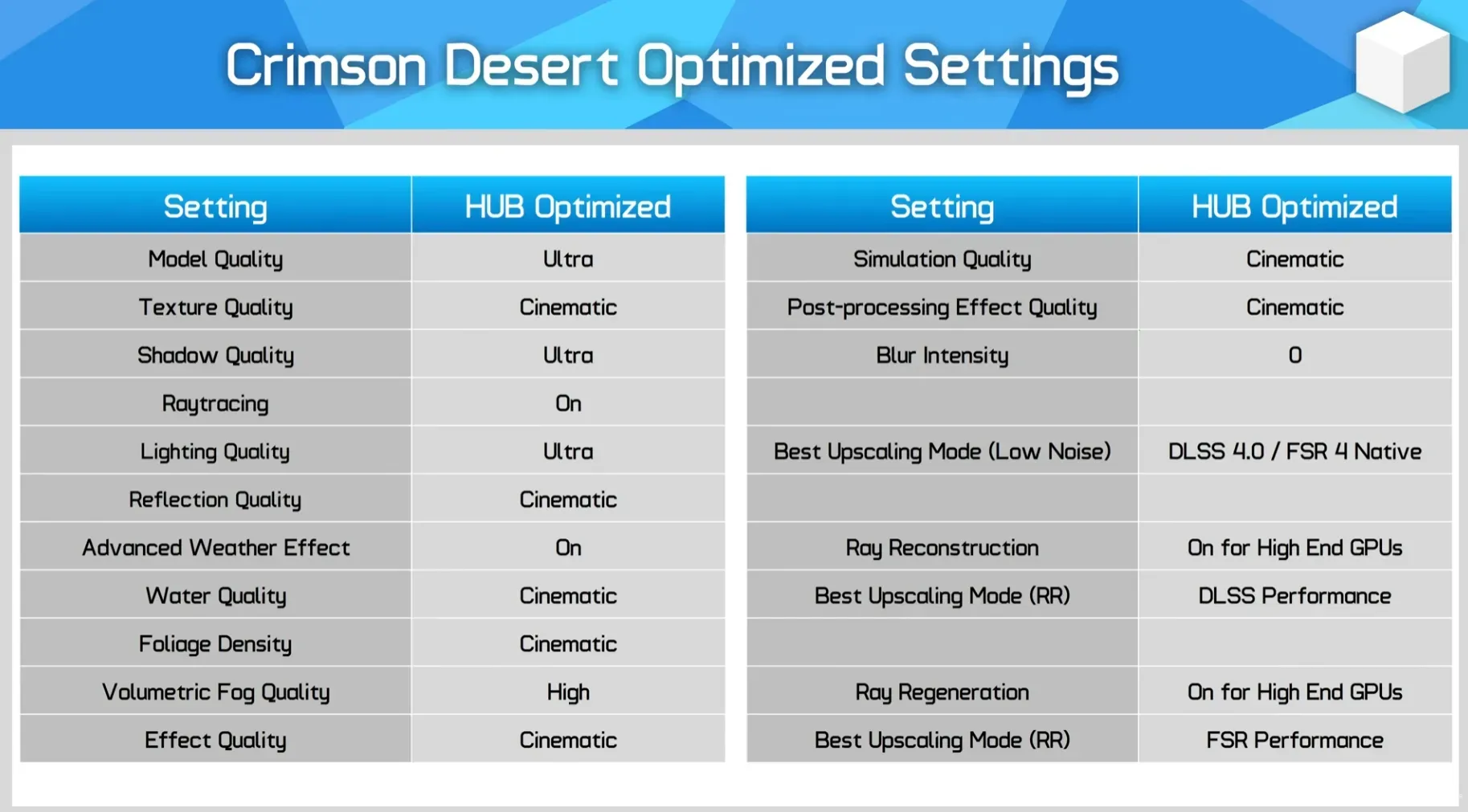
Here is the recommended config. The idea: keep the visual quality close to Cinematic while gaining a good 18% FPS.

Synthese des settings optimises pour Crimson Desert PC Click to enlarge
Setting Recommended Value Why
Model Quality Ultra 4% gain, minimal visual difference
Texture Quality Cinématique Zero impact on performance, no reason to decrease
Shadow Quality Ultra 2% gain, shadows still sharp
Ray Tracing On Cutting it does not improve performance and degrades the image.
Lighting Quality Ultra 9-10% gain, the biggest leverage in the game
Reflection Quality Cinématique Negligible impact, better to keep the maximum
Advanced Weather Effect Activated No measurable impact
Water Quality Cinematic Free in performance
Foliage Density Cinematic Low impact, denser world.
Volumetric Fog Quality Élevé 2% gain, nearly identical quality
Qualité de l'effet Cinematic No impact
Simulation Quality Cinématique No impact
Qualité des effets de post-traitement Cinématique 1% max
Blur Intensity 0 Personal preference, no performance impact
Upscaling recommended DLSS 4.0 / FSR 4 native Less noise than in DLSS 4.5
Ray Reconstruction Enabled (if high-end GPU) Better image but very expensive
Swipe to view more

Performance improvement: the numbers

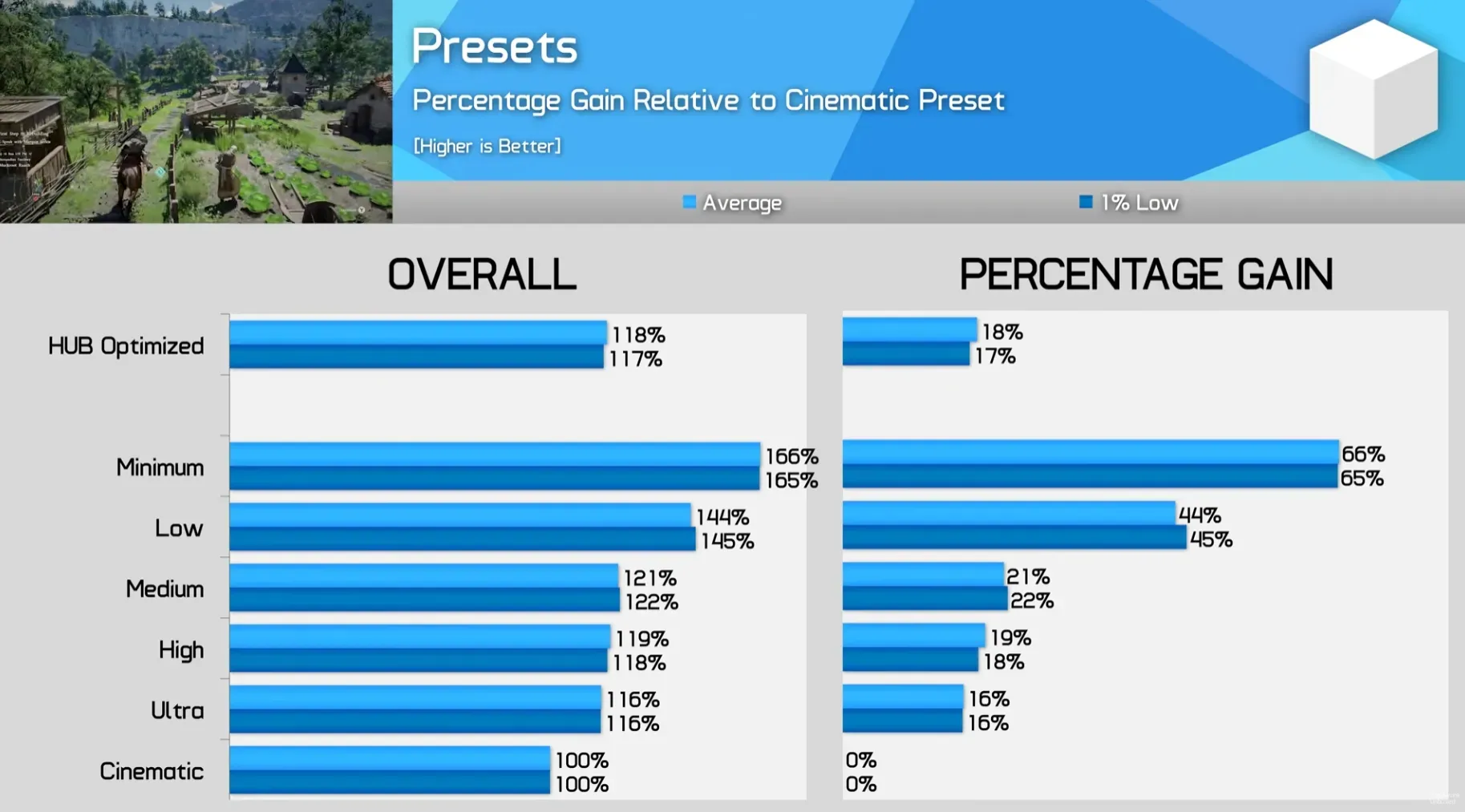
With these optimized settings, we obtain approximately 18% more FPS compared to the Cinematic preset, with very close image quality. It is better than the Ultra preset (+16%) and even better than the High preset (+19%), while maintaining superior visuals to these two presets.

Comparaison des presets Crimson Desert - gain de performance Click to enlarge

The Medium preset gives +21% and Low +44%, but the visual degradation starts to show. As for the Minimum... +66% but it's clearly a survival mode for really outdated hardware.

Crimson Desert is already quite well optimized by default. The Cinematic preset runs smoothly on recent hardware without aggressive upscaling. These optimizations are mainly for those who want to go from 50 to 60 FPS, or from 60 to a good 70+ for a smoother gameplay — the game feels significantly better at a high framerate thanks to how the character interacts with the world.

FAQ: Crimson Desert optimization

Is Crimson Desert well optimized on PC?

Yes, rather. It's not a Borderlands 4 where everything needs to be lowered for it to run. The game is playable on modest hardware with the Medium preset and runs comfortably in Cinematic on recent mid-range hardware (RTX 5060 Ti, RX 9070 XT). The issues are mostly cosmetic (noise, pop-in) and not related to raw performance.

Should Ray Tracing be enabled or disabled?

Activate it. Always. The engine is designed around RT and disabling it does not give any extra FPS - sometimes it even removes some. It's a rare case where ray tracing is both more beautiful and faster than the fallback.

DLSS 4.0 or DLSS 4.5, which one to choose?

DLSS 4.0, for the moment. DLSS 4.5 (presets M and L in the game menu) introduces more noise in certain scenes. It's probably an implementation issue that Pearl Abyss will fix with a patch, but in the meantime, DLSS 4.0 provides a more stable image.

What is the best setting to reduce visual noise?

Lighting Quality on Ultra or Cinematic (not Max), DLSS 4.0 instead of 4.5, Ray Tracing enabled, and highest possible rendering resolution. If you have a high-end Nvidia GPU, Ray Reconstruction cleans up the image a lot but costs a lot in FPS.

Why are the textures blurry when I use upscaling?

It is a known issue with the current build. Upscaling degrades textures more than in other games. Hardware Unboxed believes it is a bug that will be fixed. In the meantime, playing in native (DAA) or in DLSS Quality gives the best results.

What graphics card do you need for Crimson Desert?

For comfortable 1440p with our optimized settings, an RTX 5060 Ti or an RX 9070 XT do the job very well. For native 4K without upscaling, you will need to aim for at least an RTX 5080. Check out our GPU comparison for Crimson Desert for precise figures per card.