yuux
Co-founder of DropReference, I'm here to give you the best tips to build the gaming PC of your dreams!
yuux
Co-founder of DropReference, I'm here to give you the best tips to build the gaming PC of your dreams!
Nvidia is releasing DLSS 4.5 Ray Reconstruction in August 2026 for all RTX. We explain how it works, what it changes visually, and how to activate it in two clicks.
You may have seen the info: Nvidia launches DLSS 4.5 Ray Reconstruction in August 2026 , and this time it concerns all the RTX cards . Not just the 5000. All of them. From the RTX 2060 to the RTX 5090. So yes, said like that, one might think it's yet another marketing buzzword — except that no, it's a real change in the way your games display ray tracing.
The concept: instead of using a classic denoiser to clean up reflections and shadows in ray tracing — a trick that has existed since 2018 and has always been a shaky compromise between noise and blur — Nvidia replaces it with a neural network trained on supercomputer . The AI model guesses the missing details where the engine hasn't had time to cast enough rays. It sounds marketing, but in reality, it really changes what you see on the screen.
27 supported games at launch. Cyberpunk 2077, Alan Wake 2, Crimson Desert, DOOM: The Dark Ages, Indiana Jones... And it's free — an update via the Nvidia app. We explain how it works, what it changes concretely, and how to activate it.
To understand Ray Reconstruction, you first need to understand the problem it solves. When a game does real-time ray tracing, it doesn't cast millions of rays per pixel — that would cost way too much in GPU power. It casts a few, and the raw result is full of noise . Grain everywhere. Reflections that sparkle like an old cathode-ray television.
Until now, we used a denoiser — an algorithm that smooths out noise. The problem: it smooths out EVERYTHING. Reflections lose detail, shadows become mushy, and when you move the camera, you see ghosting — ghost trails on moving objects. That's the price to pay since ray tracing has existed in games.
 Click to enlarge
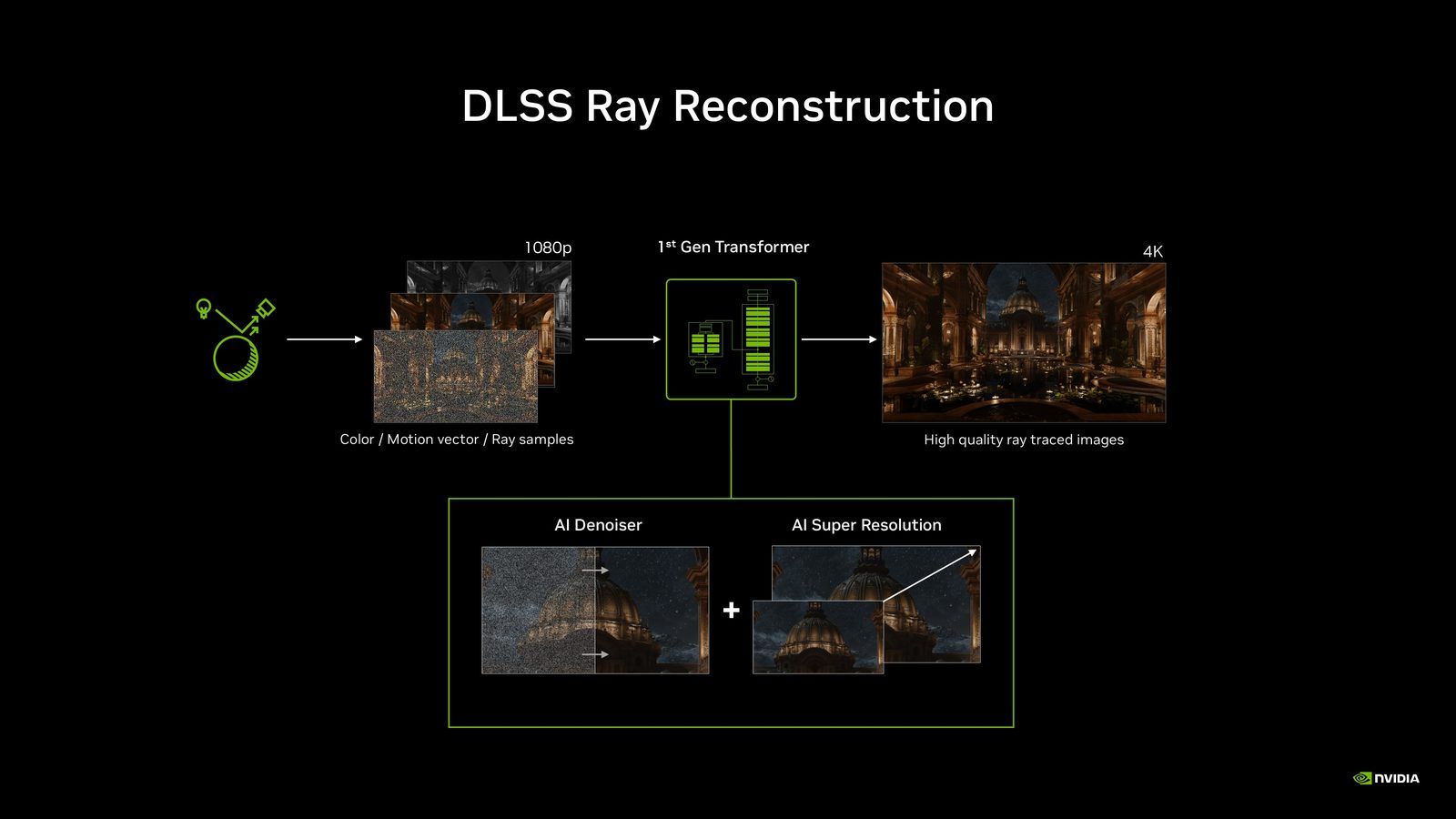
Ray Reconstruction changes the approach. Instead of blindly smoothing, Nvidia's AI model analyzes the engine data — the ray samples, motion vectors, the temporal history of previous frames — and rebuilds the missing pixels . It does not smooth: it guess what ray tracing would have calculated with an unlimited budget of rays. Nvidia unifies the denoiser and super resolution into a single transformer pipeline.
Version 4.5 goes further than the previous ones. The new model features 35% more computing capacity and 20% additional parameters , while maintaining similar performance to the old one. Translation: more reconstructed details, better temporal stability, less motion ghosting. And yes, it runs just as well as the old model.
Well, let's stop the theory. In practice, here is what you will notice when activating Ray Reconstruction in a compatible game.
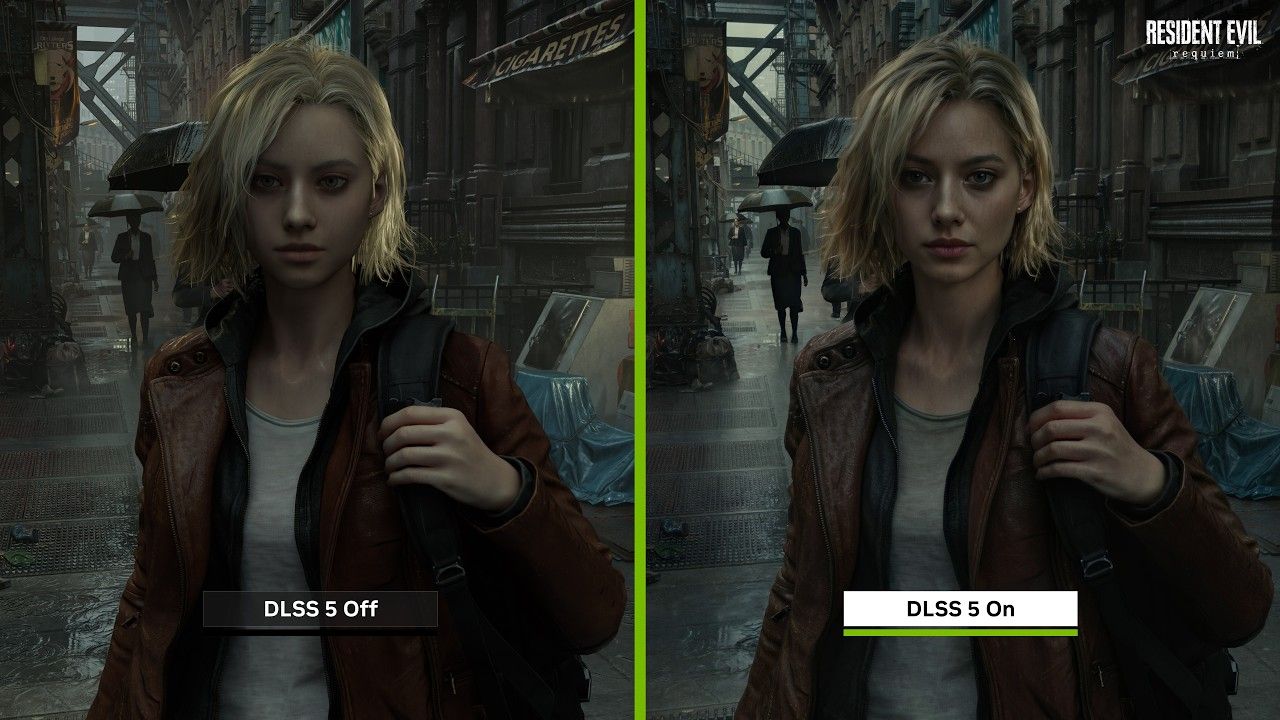
The most visible thing is on the reflections. In Cyberpunk 2077 for example, the puddles in path tracing were a festival of shimmering with the old denoiser. Every frame, the neon reflections moved a bit, the grain returned, it was "trembling". With Ray Reconstruction, the reflections are stable frame after frame. The neon in the puddle remains sharp even when you walk next to it.
Ghosting is that semi-transparent trail you see behind an NPC that moves or a particle effect. In Indiana Jones and the Great Circle, Nvidia shows that snow effects no longer leave a ghost halo behind them. It seems like a detail, but once you notice it, you can't unsee it.
In PRAGMATA, the laser effects had a problem: when the laser turned off, the light remained briefly imprinted on the scene — an artifact of the denoiser that "remembers" too long. With the new model, the light responsiveness is almost instantaneous. The light appears and disappears as it should.
Alan Wake 2 is a good guinea pig. There is a scene with a cathode ray tube TV displaying static snow — lots of little white lines moving. The old denoiser crushed them into a gray mush. Ray Reconstruction 4.5 preserves the individual lines with much more sharpness. It's the kind of detail you would have never seen without the comparison, but it shows the model's precision.
Be careful anyway : some comparisons note that Ray Reconstruction can provide a slightly softer rendering than DLSS 4.5 upscaling alone in some cases. This is normal — the model does denoising AND reconstruction, so there is a balance to be found between sharpness and stability. Overall, the gain in ray-traced image quality is clear.
| Game | Ray Tracing | Path Tracing |
|---|---|---|
| Alan Wake 2 | Yes | Yes |
| Avatar: Frontiers of Pandora | Yes | No |
| Backrooms: Escape Together | Yes | No |
| Call of Duty: Black Ops 7 | Yes | No |
| Crimson Desert | Yes | No |
| Cyberpunk 2077 | Yes | Yes |
| Death Relives | Yes | No |
| Directive 8020 | Yes | No |
| DOOM: The Dark Ages | Yes | No |
| Enlisted | Yes | No |
| EVERSPACE 2 | Yes | No |
| F1 25 | Yes | No |
| FBC: Firebreak | Yes | No |
| Half-Life 2 RTX | Yes | Yes |
| Hogwarts Legacy | Yes | No |
| Incursion Red River | Yes | No |
| Indiana Jones and the Great Circle | Yes | No |
| NARAKA: BLADEPOINT | Yes | No |
| NTE (Neverness to Everness) | Yes | No |
| Portal with RTX | Yes | Yes |
| PRAGMATA | Yes | No |
| Resident Evil Requiem | Yes | No |
| Samson | Yes | No |
| Star Wars Outlaws | Yes | No |
| Subliminal | Yes | No |
| Sword of Justice | Yes | No |
| The First Descendant | Yes | No |
That's the good news: it's free and it takes two minutes. No need to reinstall anything in the game — the model goes through the Nvidia app.
1. Update your Game Ready driver. Open the Nvidia app (not GeForce Experience, it's been dead for a while) and install the latest driver from August 2026. Without that, the 4.5 model will not be available.
2. Go to the Charts tab from the Nvidia app. You can choose a specific game or apply the setting globally.
3. Find "DLSS Override — Model Presets" . It is in the advanced options of the selected game.
4. Set Ray Reconstruction to "Latest" . It forces the game to use the 4.5 model instead of the old one embedded in the game. You can also set Super Resolution to "Latest" for the upscaling bonus.
5. Click "Apply" and launch your game. That's all.
The game must already support Ray Reconstruction in its graphics options. The Nvidia app override updates the model used, but it does not add the feature to a game that does not have it. If your game already has a "Ray Reconstruction" or "DLSS Ray Reconstruction" toggle in its settings, you're good. Otherwise, you have to wait for the dev to integrate it.
And no, it doesn't work on AMD or Intel cards. It's pure Nvidia — Tensor Cores required.
Nvidia announces that Ray Reconstruction runs on all the RTX , from series 20 to 50. But let's be honest: the result is not the same everywhere.
The gain in visual quality is identical regardless of the GPU . The AI model runs on Tensor Cores and produces the same rendering. Where it changes is in the headroom. A RTX 2060, it activates ray tracing and Ray Reconstruction, but it has so little headroom left that you will have to lower the internal resolution — and there, the visual gain is partially eaten up by aggressive upscaling.
RTX 4060 / 4070 : the true sweet spot. Enough RT power to maintain correct settings, and the gen 4 Tensor Cores run the model comfortably. This is where you see the biggest delta between before and after — because you have enough performance not to have to lower everything around.
RTX 5070 and above : absolute comfort. The Blackwell Tensor Cores are faster, the ray tracing budget is huge, you can max everything out and Ray Reconstruction does its job without compromise. But the visual leap compared to a 4070 is not that drastic — it's mainly the framerate that benefits.
RTX 3060 / 3070 : it works, but it's tight. You enjoy the best image quality, but not at the resolution or with the settings you would necessarily want. No miracle.
In short, if you have an RTX 4060 or better, it's time to enable ray tracing in your games. Below that, it will depend on the title.
Not directly. Ray Reconstruction replaces the denoiser, not the upscaler. The goal is to improve image quality, not framerate. Nvidia announces performance similar to the old model, so you should neither lose nor gain significant FPS by enabling it.
Yes. All RTX since the 20 series are compatible. However, ray tracing will be more demanding on a 3060 than on a 5070 — Ray Reconstruction does not change that. You need to be able to run RT in the game to take advantage of it.
Two different things. Super Resolution deals with upscaling — taking low resolution and reconstructing it in high resolution. Ray Reconstruction deals with denoising — cleaning the noise from ray tracing. Both can work together, and that's where we get the best result.
Because the game must integrate Ray Reconstruction into its engine. It is not a post-process filter that we apply on top — the model needs the raw data from the engine (ray samples, motion vectors, temporal history). Each game must implement it on the developer side. Nvidia is pushing, but it takes time.
Not yet. AMD is working on FSR 4 which includes AI denoising, but nothing equivalent to Ray Reconstruction is available to date on the Radeon side. This is an exclusive advantage for Nvidia at the moment — and probably the most tangible for the average gamer.
DLSS 4.5 Ray Reconstruction is probably the most interesting DLSS update since the launch of Frame Generation. Not because it adds FPS — it does not add any. But because it fixes a fundamental problem of real-time ray tracing: noise and artifacts from the denoiser.
If you have an RTX card and you play one of the 27 supported titles, there's zero reason not to activate it. It's free, it takes two clicks in the Nvidia app, and the result is visible to the naked eye — especially in games with heavy ray tracing like Cyberpunk 2077, Alan Wake 2, or DOOM: The Dark Ages.
The only downside: 27 games is few. But Nvidia promises more than 1000 RTX titles in the long run, and the model can be pushed by the app to any game that already supports the feature. It's going to grow.
In the meantime, update your driver, open the Nvidia app, and set Ray Reconstruction to "Latest". You'll thank me.